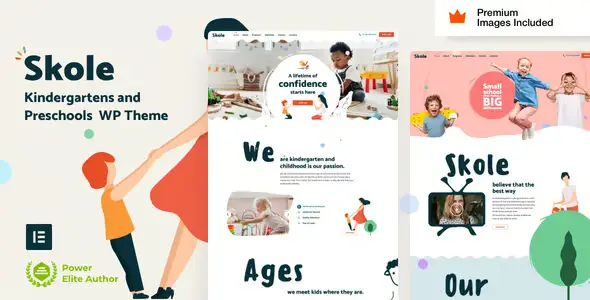
Skole Children Kindergarten Theme

$90.00 Original price was: $90.00.$4.99Current price is: $4.99.
A specialized theme for nurseries and preschools that structures content, improves the family experience, and simplifies maintenance on WordPress, integrating with WooCommerce when online enrollment or payment management is needed.
Skole Children Kindergarten Theme is a premium theme designed for nurseries, preschools, and educational centers seeking a clear, easy-to-understand, and scalable digital presence on WordPress. It's ideal for showcasing services, activities, teaching staff, and contact forms, while maintaining a stable and optimized visual structure.
Introduction to Skole Children Kindergarten Theme
This theme is designed for children's educational websites on WordPress, facilitating the management of content, schedules, programs, and admission forms with a coherent and clean visual structure, improving the browsing experience for families and simplifying internal content update flows in the administration panel.
On a technical level, it's a tool focused on visual layout, legible typography, soft color palettes, and pre-configured sections for educational services, testimonials, galleries, and news. Integration with forms, custom blocks, and calendar modules reduces operational friction for the staff who manage the site daily.
Imagine a technician inheriting a WordPress site from a daycare center with disorganized pages, mismatched templates, and inconsistent menus. By applying this plugin, they can unify the classroom page layout, restructure navigation, create ad templates, and optimize the contact page with maps, schedules, and clear calls to action.
Product overview
This module primarily acts on the visual and structural layer of WordPress, prioritizing usability for families, consistency of the educational center's identity, and a clear organization of key information, directly affecting the perceived stability of the site, the user experience, and the ease of keeping content updated.
Before implementation, a small preschool typically has a basic website with a single list of services, lacking separate sections for activities or staff. During implementation, pages are reorganized, classroom templates are activated, parent review blocks are added, and galleries are sorted by event.
- Step 1: Initial situation without the add-on. The school has generic pages, unclear menus, and duplicate content, making it difficult for families to find information about schedules, fees, or activities.
- Step 2: Key action using a specific function. The implementer applies a specific template for educational programs, configures the homepage with drag-and-drop sections, and defines reusable blocks for contacts and appointment calls.
- Step 3: Observable results in operation (less friction, more control, fewer errors). Management can update news without altering the design, menus are consistent, parents can quickly find information, and visit requests increase due to the improved UX.
Requirements and dependencies (without versions)
This theme requires a stable WordPress environment, hosting with reasonable resources, a database without errors, and a plugin configuration limited to what is necessary, checking compatibility of visual builders, caching, and form modules before deploying it to production to avoid layout conflicts.
- Primary dependency (if applicable) expressed without versions. Requires a properly configured WordPress core and usually relies on a visual page builder or included custom blocks, so it's advisable to check that they don't overlap with other installed page builders.
- General compatibility (checkout, renewals, roles, taxes, shipping) depending on the tool type. It can be integrated with WooCommerce to manage enrollments, activity payments, or school supply sales, respecting store, cart, and checkout templates without disrupting basic workflows.
- Typical limitations or scenarios where it's advisable to test first (without being alarmist). In environments with many design plugins, legacy shortcodes, or outdated templates, it's recommended to set up a test environment and verify headers, footers, and blog templates before migrating the entire design.
Key benefits for your project
- Visual architecture focused on early childhood education. This plugin offers structures designed to showcase classrooms, programs, teachers, and activities, avoiding improvisation with generic templates. The result is more streamlined navigation for parents, fewer unnecessary clicks, and a back office where each type of content has a clear place.
- Improved user experience on mobile devices. The sections are designed so that critical information such as hours, location, and contact details are displayed correctly on small screens. Technically, the number of heavy decorative elements has been reduced, resulting in faster loading times and smoother interaction on mobile devices.
- More organized content management for the team. The tool provides consistent templates for news, events, and announcements, allowing non-technical staff to publish updates without altering overall styles. This reduces layout errors, maintains a consistent visual identity, and streamlines internal communication.
- Scalability for centers with multiple locations or groups of classrooms. By reusing sections and blocks, it's possible to clone pages for different locations, changing only specific data. This facilitates expansion to new locations without redoing the entire design, maintaining operational consistency across different sites or sections.
- Seamless integration with forms and lead generation. It allows you to place contact forms, visit requests, and pre-registration forms in strategic locations, with clear calls to action. From an operational perspective, it simplifies request tracking by centralizing data entry into controlled workflows.
- Better foundation for SEO and semantic search. It doesn't work miracles with rankings, but it does provide clear structures for service pages, team pages, testimonials, and FAQs, making it easier to mark up content with logical titles, understandable hierarchies, and coherent text that search algorithms and generative search engines interpret more accurately.
Key features of Skole Children Kindergarten Theme
- Specific templates for nurseries and preschools. Includes designs tailored for classrooms, educational programs, timetables, and teaching staff, reducing manual layout work and improving the user's experience from the homepage to the contact form or visit request page.
- Sections for activities, events, and image galleries. This module makes it easy to showcase daily activities, excursions, and special events with categorized galleries, helping families visualize the center's daily life. It also organizes content chronologically for easy maintenance in the back office.
- General compatibility with WooCommerce for tuition and activity payments. If a store is activated, the design maintains aesthetic consistency across product listings, the shopping cart, and the checkout process, avoiding abrupt visual transitions when parents move from informational pages to payment pages.
- Optimization for easy reading and user-friendly typography. The tool prioritizes appropriate font sizes and smooth yet legible contrasts, designed for users who quickly scan information. This reduces the abandonment rate due to illegible text and improves the perception of the center's professionalism.
- Blocks and widgets for parent testimonials and reviews. This allows you to display verifiable family opinions in specific sections, integrating these modules in an organized way. This structure helps build trust and concentrate social evidence where it most influences the decision to contact.
- Customization options for colors and visual identity. It offers controls to align the color palette with the center's branding without touching code. This accelerates implementation processes and allows different educational projects to share a graphic style while maintaining slight variations for each location or program.
Who is this product ideal for?
This plugin is suitable for early childhood education centers, nurseries, academies, and small schools that need a clear digital presence, as well as for agencies and professionals who manage multiple WordPress projects in the education sector and are looking for consistency, easy maintenance, and a design adapted to families with little time to browse.
- Administrators who need order and traceability. Directors and coordinators who update news, circulars, or events will find a predefined structure where each type of content has its place, making it easy to review what is published, when, and in which sections.
- Teams with multiple projects and operational consistency. Web agencies or freelancers with several school and daycare websites can standardize processes, reuse templates, reduce design time, and maintain similar navigation patterns, simplifying training and internal support.
- Implementers, designers, and marketing managers. Professionals who manage lead generation campaigns, landing pages for open days, and informational content will be able to create new pages without breaking the base design, maintaining consistency between ads, social media, and the website.
Practical use cases
- Case 1: A small daycare center has a website with only a contact page and plain text. Problem: Parents don't understand the educational approach or schedules. Extension use: Sections are created for classrooms, daily routine, teaching staff, and a photo gallery. Result: Clearer navigation and an increase in visit requests.
- Case 2: A school with extracurricular activities wants to sell places online. Problem: The current checkout flow is confusing and visually inconsistent. Theme implementation: WooCommerce templates are aligned with the educational design, the checkout process is simplified, and key messages are highlighted. Result: Fewer abandoned checkout pages.
- Case 3: A network of children's academies manages several locations. Problem: each website has a different design, making it difficult to maintain. Solution: a base site is created with replicable templates for each location, requiring only local data changes. Result: reduced maintenance effort and a consistent user experience.
- Case 4: A center needs to communicate changes to schedules and protocols. Problem: Notices are scattered across networks and PDFs. Use of the plugin: A notices section and a categorized blog are created, linked from the homepage. Result: Families can quickly find updated information, and the volume of repetitive inquiries is reduced.
Frequently Asked Questions about Skole Children Kindergarten Theme
Which type of WordPress installation does it work best with?
It works best on clean WordPress installations with a moderate plugin base and no competing visual builders. It's recommended to ensure your hosting has sufficient resources, controlled caching, and a database without orphaned tables before deploying the Skole Children Kindergarten Theme in a production environment.
How does this affect the payment process and the checkout experience?
When integrated with WooCommerce, it maintains a consistent design across the school's information pages and the shopping cart and checkout screens, avoiding abrupt visual transitions. This creates a smoother experience for parents, who perceive a continuous environment when booking places, paying tuition, or registering for extracurricular activities on the site.
Does it allow you to automate content sections or rules?
It doesn't automate complex processes on its own, but it provides structures and templates that easily integrate with automation plugins, advanced forms, or notification systems. This allows you to schedule posts, group news by category, and use reusable blocks that reduce manual work in recurring publishing.
Is it suitable for managing recurring payments or service renewals?
Managing renewals or recurring payments relies primarily on WooCommerce and specific payment extensions, but the Skole Children Kindergarten Theme provides the visual layer for displaying plans, educational cycles, or fees. The key is to test renewal flows in a staging environment, reviewing text, confirmation messages, and navigation paths.
How does an educational store handle taxes, shipping, or coupons?
Tax calculations, shipping costs, and coupons are handled by WooCommerce or other tax plugins, while this theme presents that data clearly. In practice, the design aims to ensure that tax fields, promotional codes, and totals are legible and properly aligned with the center's branding.
What impact does this have on site performance and stability?
The performance impact will depend on a combination of hosting, caching, image size, and the number of active plugins. The Skole Children Kindergarten Theme is designed for reasonable use of visual resources, but it's always advisable to optimize images, minimize unnecessary scripts, and monitor loading times after applying the new design.
Is it viable to use it in multisite or multi-store educational environments?
It can operate in multisite environments, which is useful for educational groups with multiple locations, provided the network is well-managed. Each site can share the same design foundation and be customized with specific colors, logos, and content, while maintaining centralized control over updates and overall environment maintenance.
How can I verify that the site is working correctly after setting it up?
A practical validation includes reviewing the homepage, navigation, menus and internal links, testing forms on different devices, checking that the shop and checkout pages (if any) maintain the design, running basic speed tests and asking real parents to find hours, address and contact information to detect potential friction points.

Written and reviewed by the PrimeGPL Team
At PrimeGPL, we ensure that every piece of published content is verified and reviewed by our team. We analyze features, compatibility, and performance to provide you with clear, up-to-date, and truly useful information for each product listed in our store.
Get your questions answered here
We answer your questions so you can buy in an informed and confident manner.
Does my purchase include updates?
Yes. Every product purchase includes lifetime updates, so you won't have to pay extra under any circumstances.
Is there a daily download limit?
No, not at all. After your purchase, you can download it as many times as you need, without any problem.
On how many websites can I use the products?
You can use your purchases on as many domains (websites) as you want, without any problems.
Does it include technical support?
Yes. We offer technical support Monday through Friday, during business hours UTC -3. This support includes assistance with issues related to download problems, installation problems, or errors with the purchased product.
Furthermore, support does not include configurations, customizations, tutorials, or services associated with the author.
Does my purchase have a warranty?
Yes, of course. If you have any problem that we can't solve, or if there's an external issue that doesn't have a general solution related to our service, you'll receive support and, if necessary, a full refund.
How do I access support?
After your purchase, from your user account, you can access the support section, where you can open a ticket and our team will assist you with whatever you need.
Download Previous Versions
If you have purchased this product, or have an active membership, you can download previous versions without any limits or restrictions.
| Product Name | Version | Size | Date | Download |
|---|---|---|---|---|
| No hay versiones anteriores registradas. | ||||
Related Products
Below we show you different products that share the same category.