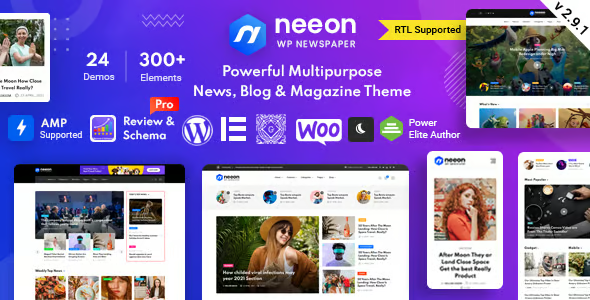
Neeon WordPress News Magazine Theme

$39.00 Original price was: $39.00.$4.99Current price is: $4.99.
WordPress news and magazine theme geared towards high-content portals, with modular layouts, optimized reading experience and scalable editorial structure, ideal for combining digital media and projects with WooCommerce.
This premium theme for digital magazines and newspapers allows you to build highly structured news portals with flexible layouts focused on readability, performance, and editorial organization. It's ideal for media outlets, niche blogs, and massive content sites that require clear hierarchy, dynamic modules, and granular design control without sacrificing stability.
Introduction to Neeon WordPress News Magazine Theme
This plugin is a specialized WordPress theme geared towards online news and magazines that organizes content into optimized blocks, grids, and listings, improving editorial workflows, category navigation, and mobile consumption, as well as facilitating a clean architecture that reduces operational friction on sites with a high volume of daily publications.
The tool integrates with the WordPress core, leveraging taxonomies, widgets, and visual builders to organize news by section, highlight columns or breaking news, and maintain a clear hierarchy. It doesn't add unnecessary complexity to the back office; instead, it translates configurations into reusable templates aligned with a scalable content strategy.
In a real-world micro-scenario, a technician managing a news portal with a blog, post rankings, and sponsored sections uses this module to define templates for the homepage, category pages, and individual posts, ensuring visual consistency while maintaining reasonable loading times even when traffic spikes during peak hours.
Product overview
This extension operates on the site's presentation layer, managing layout, typography, content grids, and homepage modules, with a direct impact on the reading experience, perceived stability of the front end, and ease of maintenance for editorial teams that publish and reorganize content frequently.
A small local news website previously used a generic theme with scattered widgets and little hierarchy. During the implementation, blocks were set up for headlines, neighborhood sections, and events. As a result, navigation became more predictable, and users could find recent and archived articles with fewer clicks.
- Step 1: Initial situation without the plugin. The site uses a multipurpose theme that is poorly optimized for news, with no dynamic homepages, cluttered menus, and users getting lost among old posts.
- Step 2: Key action using a specific function. Magazine layouts, post blocks by category, featured sliders, and chronological lists are configured, applying specific templates to the homepage, archive, and details.
- Step 3: Observable results in operation (less friction, more control, fewer errors). The editorial team changes sections without touching code, readers reach relevant information faster, and manual layout errors decrease.
Requirements and dependencies (without versions)
This news theme requires a working WordPress installation with stable hosting, reasonable PHP and database resources, and preferably a compatible visual builder, checking beforehand for the presence of layout, caching, and optimization plugins that may overlap or generate style conflicts in production.
- Primary dependency (if applicable) expressed without versions. It depends on the WordPress core and, in many cases, on a page builder supported by the theme to display pre-built sections, custom widgets, and grid or carousel-type homepage elements.
- General compatibility (checkout, renewals, roles, taxes, shipping) depends on the type of tool. Although focused on editorial content, it is often integrated with WooCommerce to sell subscriptions, merchandise, or digital publications, respecting the standard cart, checkout, and editor/author roles flow.
- Typical limitations or scenarios where it's advisable to test first (without being alarmist). It's a good idea to validate templates in environments with many ad plugins, membership systems, or alternative builders to avoid overlapping shortcodes, duplicate styles, or broken layouts on mobile devices.
Key benefits for your project
- Clear and scalable editorial architecture
This module offers structures designed for high-volume newspapers, magazines, and blogs, making it easy to segment by categories, tags, and authors. This reduces manual layout tasks for the team and maintains a consistent visual style even when sections, content campaigns, or publication frequency change. - Improved reading and browsing experience
The tool prioritizes visual hierarchy: defined headings, listings by relevance or chronology, clean sidebars, and featured modules. This reduces bounces due to confusion, improves file browsing, and allows you to experiment with different homepage layouts without having to recreate templates from scratch. - Design flexibility without always depending on development
This plugin enables configurations of layouts, fonts, colors, and modules through options panels and reusable blocks. This allows designers and product managers to test new homepage structures, sponsored sections, or thematic blocks without involving a developer for every minor change. - More organized editorial operations
The tool leverages native WordPress features (posts, categories, menus) and extends them with widgets and templates, ensuring a seamless workflow for creation, review, and publication. Editors can focus on content, not on fixing layout issues or visual inconsistencies. - Ready to grow with more traffic and sections
Thanks to its modular structure, this theme facilitates the progressive expansion of sections: supplements, specials, trending tags, or category-specific covers. This makes it easy to scale editorial operations without aggressive redesigns or disruptive changes that break the user experience.
Featured Features of Neeon WordPress News Magazine Theme
- Magazine-style cover templates
The tool includes predefined magazine-style layouts with headline blocks, sliders, mixed grids, and columns. Its importance lies in its ability to visually reorganize content, directly impacting how key news stories are highlighted and how information is distributed on the homepage. - Custom widgets for news listings
This module provides widgets to display posts filtered by category, tag, author, or other specific criteria. This improves workflows in WooCommerce when combining a blog and store, allowing for sections with recommended articles, product news, or content linked to campaigns without requiring SQL queries. - Compatibility with visual builders
The extension typically integrates with popular page builders, allowing you to insert news blocks, custom headers, and promotional sections without coding. This speeds up the creation of editorial landing pages, special event pages, or themed coverage aligned with the product catalog if WooCommerce is present. - Headers and menus adapted to news portals
The theme offers header structures with multi-level menus, areas for breaking news, and quick access to key sections. On WooCommerce sites, this helps combine editorial navigation and store access, maintaining a clear hierarchy that facilitates the discovery of related content and products. - Responsive design optimized for mobile reading
The tool prioritizes legible fonts, adequate spacing, and touch components on mobile phones and tablets. For users accessing the site from social media or notifications, this translates to less friction while reading, smoother scrolling, and less need to zoom, enhancing the overall experience.
Who is this product ideal for?
This plugin is especially suitable for teams that manage digital media, themed blogs, corporate magazines, or hybrid portals with editorial content and a catalog, where the visual layer directly influences how news, guides, or analysis articles are consumed in WordPress.
- Administrators who need order and traceability.
Profiles that coordinate several editors and authors require a clear hierarchy of categories, front-end control, and the ability to track how critical sections are displayed without wasting time reviewing scattered templates. - Teams with multiple projects and operational consistency.
Agencies or studios that maintain several news websites and corporate blogs, and need to replicate structures, editorial patterns and visual rules without rebuilding everything from scratch in each implementation. - Implementers, designers, and marketing managers.
Professionals seeking a solid foundation for content campaigns, sponsored sections, launches, and visual storytelling, being able to quickly adjust headers, blocks, and layouts while respecting site stability.
Practical use cases
- Technology news portal with traffic spikes
Context: A tech blog with frequent releases. Problem: A chaotic homepage that's difficult to scan on mobile devices. Extension use: Magazine layouts, category blocks, and a release carousel are implemented. Result: Clearer navigation; users can quickly find analyses, reviews, and comparisons. - Corporate magazine linked to an online store
Context: A company with WooCommerce and a news section. Problem: Disconnected content and products. Theme use: Templates were created that integrate post listings with related products, guides, and success stories. Result: A more cohesive experience and greater interaction between editorial content and the product catalog. - Local media outlet with several writers and sections
Context: A city newspaper with sports, culture, and politics sections. Problem: Manual layout of the front page each week. Tool use: Configuration of automatic blocks by category and scheduled featured articles. Result: Fewer repetitive tasks for editors and always up-to-date front pages. - Niche blog growing into a leading website
Context: A personal blog gaining audience and contributors. Problem: An outdated structure, difficult to scale. Plugin use: Adoption of magazine templates, hierarchical menus, and thematic sections. Result: A smooth transition to a portal with a larger volume of content without losing its identity.
Frequently Asked Questions about the Neon WordPress News Magazine Theme
Which type of WordPress installation does it integrate best with?
It works best on standard WordPress installations with a well-defined structure of posts, pages, categories, and menus, without the burden of experimental child themes. It's recommended to use it on a relatively clean site, review existing layout plugins, and deactivate old templates to avoid visual conflicts.
Does it affect the checkout process when I use WooCommerce?
The focus is on the editorial layer, so the checkout process typically relies on WooCommerce templates, adhering to the standard payment flow. Even so, it's important to validate the design of the form, buttons, and error messages, ensuring that colors, fonts, and header elements are not distracting or confusing.
Does it allow you to automate how news and sections are displayed?
The tool doesn't create complex automations on its own, but it does allow for visual rules such as blocks that always display the latest posts, news by specific category, or featured posts based on pre-configured criteria. Combined with editorial automation plugins, workflows can be set up where the homepage is updated automatically without continuous manual intervention.
Does it have an impact on subscription renewals or failed payments?
The theme doesn't directly handle renewals or payments; that's handled by WooCommerce or subscription plugins. However, it does improve the clarity of account pages, help sections, and informational messages. Setting up clean templates for 'My Account' and informational pages helps users understand payment statuses and necessary actions.
How does it handle taxes, shipping, and coupons in a store?
Tax settings, shipping methods, and coupons remain under the control of WooCommerce and its extensions. The theme's role is to present forms, messages, and order summaries clearly. It's advisable to verify that columns, tables, and notifications display correctly on both mobile devices and computers to avoid misunderstandings in the shopping cart.
What performance and stability considerations should I keep in mind?
Because this theme features complex visual modules and layouts, it's recommended to combine it with caching, image optimization, and a review of unnecessary scripts. Testing homepages with numerous blocks, sliders, and ads helps identify bottlenecks and determine which visual effects are truly necessary without compromising overall stability.
Is it suitable for multi-site installations or multi-store projects?
It can be used in multisite environments where different sites share a common base and only customize colors, logos, and homepage layouts. In multi-store or multi-media scenarios, this simplifies maintenance, although it's advisable to define a style guide and review key templates for each site before going live.
How can I verify that everything is working correctly after setting it up?
A practical checklist includes: reviewing the homepage, archives, and posts on mobile and desktop; verifying menus and breadcrumbs; checking cart and account templates if WooCommerce is used; testing loading times with and without caching; and asking editors to create and publish news, verifying that the layout remains stable.

Written and reviewed by the PrimeGPL Team
At PrimeGPL, we ensure that every piece of published content is verified and reviewed by our team. We analyze features, compatibility, and performance to provide you with clear, up-to-date, and truly useful information for each product listed in our store.
Get your questions answered here
We answer your questions so you can buy in an informed and confident manner.
Does my purchase include updates?
Yes. Every product purchase includes lifetime updates, so you won't have to pay extra under any circumstances.
Is there a daily download limit?
No, not at all. After your purchase, you can download it as many times as you need, without any problem.
On how many websites can I use the products?
You can use your purchases on as many domains (websites) as you want, without any problems.
Does it include technical support?
Yes. We offer technical support Monday through Friday, during business hours UTC -3. This support includes assistance with issues related to download problems, installation problems, or errors with the purchased product.
Furthermore, support does not include configurations, customizations, tutorials, or services associated with the author.
Does my purchase have a warranty?
Yes, of course. If you have any problem that we can't solve, or if there's an external issue that doesn't have a general solution related to our service, you'll receive support and, if necessary, a full refund.
How do I access support?
After your purchase, from your user account, you can access the support section, where you can open a ticket and our team will assist you with whatever you need.
Download Previous Versions
If you have purchased this product, or have an active membership, you can download previous versions without any limits or restrictions.
| Product Name | Version | Size | Date | Download |
|---|---|---|---|---|
| Neeon WordPress News Magazine Theme | 3.1.1 | 7.5 MB | 29/10/2025 | Join Now |
Related Products
Below we show you different products that share the same category.