Oxygen WooCommerce Integration

$149.00 Original price was: $149.00.$4.99Current price is: $4.99.
Connect Oxygen Builder with WooCommerce to visually design every page of your store—product, cart, checkout, account—without losing the native functionality. Enjoy complete design control, without patching or template conflicts.
Oxygen WooCommerce Integration is the native bridge between the Oxygen Builder visual builder and the WooCommerce commerce engine, designed to allow designers and developers to build fully customized checkout flows without relying on pre-designed templates. It eliminates the gap between free design and store functionality, giving you complete control over every component of the checkout, catalog, and customer account.
Introduction to Oxygen WooCommerce Integration
When working with Oxygen Builder in a WooCommerce store, the lack of native integration forces you to resort to generic shortcodes or intermediate layers that break visual consistency and limit customization possibilities; this module solves exactly that friction by exposing WooCommerce components directly within the Oxygen visual environment.
The tool doesn't act as an add-on theme or a superficial compatibility plugin. Its technical nature means that store elements—product pages, cart, checkout, customer account—become editable objects within the builder, while keeping all of WooCommerce's functional logic intact. This reduces layout errors, eliminates CSS conflicts between layers, and avoids the need for manual overrides.
A technician evaluating the tool for a fashion store with complex sizing and variant logic can build the product page from scratch in Oxygen, place the variant selector exactly where the UX strategy requires, condition the visibility of elements based on stock, and publish without touching a single line of external CSS. The result is a checkout with its own identity and no workarounds.
Product overview
The visual management of a WooCommerce store within Oxygen Builder directly affects design stability, team iteration speed, and the final buyer experience; without a solid integration, any change to the catalog or purchase flow can trigger inconsistencies that cost time and credibility.
Before implementing this plugin, the operator was working with WooCommerce templates that overlapped with the Oxygen design, creating visual conflicts that were difficult to resolve and requiring manual intervention every time something was updated. The team spent hours reconciling styles instead of building user experiences.
- Without the add-on: WooCommerce pages inherit styles from the active theme or generic template files, creating visual inconsistencies between the site and store design, and forcing the developer to maintain two design systems in parallel.
- With the active add-on: Each section of the store — from the product grid to the order confirmation — is edited directly on the Oxygen canvas using native WooCommerce Integration elements, with full access to conditions, dynamic data, and global styles.
- Observable result: The team iterates faster, design changes don't break the functionality of the shopping cart or checkout, and the store maintains visual consistency throughout all stages of the purchase flow.
Requirements and compatibility
For this plugin to work correctly, it is essential to have Oxygen Builder operational as the main site builder and WooCommerce active as the store engine; before putting it into production, it is advisable to check that there are no other compatibility plugins between both tools that could generate rendering conflicts or duplication of elements.
- Main dependency: Oxygen Builder must be set as the active site builder; without it, the specific elements of this integration have no environment in which to operate.
- Areas of compatibility: It covers store pages, individual products, cart, checkout, order confirmation, customer account, coupons, zone taxes, and shipping options configured in WooCommerce.
- Recommendation before production: In stores with custom payment gateways or advanced checkout plugins, it is advisable to validate the entire flow in a staging environment before publishing changes to the payment template.
Key benefits for your operation
- Total control of the design without breaking functionality: One of the most common pain points when customizing WooCommerce is that visual changes can interfere with the shopping cart or checkout process. This module separates the design layer from the functional logic, allowing you to modify the appearance without altering critical WooCommerce hooks. Your team can iterate on the design without fear of breaking the purchase flow.
- Drastic reduction in layout time: Building shop pages from generic templates consumes hours of fine-tuning that adds no value to the business. With this extension, WooCommerce elements are dragged, positioned, and conditioned directly in Oxygen, eliminating the repetitive cycle of editing CSS, publishing, and reviewing. What used to take days can now be done in hours.
- Shopping experience consistent with the visual identity: When the checkout page looks different from the rest of the site, the buyer's perception of trust suffers and the abandonment rate tends to increase. This tool allows each screen in the checkout process to share fonts, colors, and spacing with the rest of the site. Visual consistency is also a signal of trustworthiness for the user.
- Access to dynamic data on product pages: Displaying relevant information based on context—such as available stock, discounted price, and variant attributes—requires access to WooCommerce's dynamic data within the builder. This plugin exposes that data natively, without the need for custom code. The result is a more informative and responsive product page with minimal technical effort.
- Less reliance on developers for editorial changes: In operations where the marketing team needs to update banners, reorganize sections, or adjust calls to action in the store, relying on a developer slows down execution. With the store built on Oxygen and this integration, visual changes become accessible to less technical users. Operations gain agility without sacrificing control.
- Scalability without accumulating technical debt: Growing online stores accumulate patches, shortcodes, and overrides that eventually become unmaintainable. This plugin establishes a clean architecture from the start, where design and functionality coexist without legacy conflicts. Scaling the catalog, adding new categories, or redesigning sections doesn't require rewriting existing logic.
Key features of Oxygen WooCommerce Integration
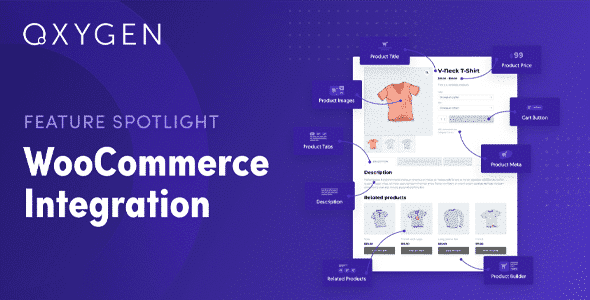
- Native WooCommerce elements in the builder: The extension adds a set of store-specific elements to the Oxygen dashboard—product image, price, variant selector, add to cart button, order summary—that behave like any other component in the builder but execute the full WooCommerce logic. This eliminates the need for shortcodes and makes the editing flow visual and predictable.
- Visually editable WooCommerce templates: Instead of overwriting PHP files in a child theme, the plugin allows you to define store templates directly in Oxygen. Every change is immediate, reversible, and visible on the canvas. For a team that frequently iterates on the design, this represents a substantial improvement in workflow speed.
- WooCommerce state-based visibility conditions: Showing or hiding elements based on whether the user is logged in, has items in their cart, or belongs to a specific role is a common need in stores with segment or membership logic. This plugin integrates these conditions directly into the editor, eliminating the need for additional conditional visibility plugins.
- Access to dynamic product and order fields: Titles, descriptions, prices, images, custom metadata, and variant data are all available as dynamic fields within Oxygen. This allows you to build highly customized product layouts that are automatically populated from the catalog, without duplicating content or maintaining static templates per category.
- Compatibility with Oxygen's global color and typography system: The store elements respect and inherit the global design system defined in Oxygen, including color variables, font scale, and button styles. When a global variable is updated, the change is propagated throughout the entire store without further intervention. This reduces inconsistencies and simplifies long-term maintenance.
- Integration with the repeater system and dynamic lists: Building product grids, category lists, or recent order lists is possible using Oxygen repeaters powered by WooCommerce queries. The operator defines the layout once, and the system populates it dynamically. It's an efficient way to manage large catalogs without individual templates.
Who is this product for?
This plugin is ideal for those already using Oxygen Builder as their primary builder and who need their WooCommerce store to be part of the same design system, without visual compromises or workarounds. It's also a good fit for teams working on multiple e-commerce projects and looking for a consistent and maintainable way to build stores without accumulating technical debt.
- Administrators and developers who need full control over the markup, styles, and conditional logic of each page in the store, without relying on external PHP template files.
- Agency teams or freelancers who manage several WooCommerce projects in Oxygen and need a replicable, consistent workflow that is easy to transfer to clients without in-depth technical training.
- UX and marketing managers that depend on being able to adjust the purchase flow, product presentation, and calls to action without opening a development ticket each time.
Real-world use cases
- Digital product store with simplified checkout: A developer works on a store that sells courses and digital templates. The standard WooCommerce checkout displays unnecessary fields—shipping address, order notes—which create friction and increase abandonment rates. With this extension, they redesign the checkout template in Oxygen, visually removing the irrelevant fields and streamlining the flow to a two-step process. The result is a cleaner checkout process that reduces perceived friction for the buyer.
- Fashion catalog with product pages differentiated by category: A clothing store needs the product pages for its premium collection to have a different layout than those for its basic items—more space for storytelling, an expanded gallery, and an integrated size guide. With Oxygen's template system and this integration, the team creates two distinct layouts and assigns them by category using native conditions. Each catalog segment has its own unique experience without increasing maintenance effort.
- Back office with a need for consistency across multiple stores: An agency manages five WooCommerce projects built on Oxygen. Until now, each store had a different implementation of the customer account area, leading to inconsistencies and complicating support. With this module and a standardized template system in Oxygen, the team establishes a common foundation for the customer area that is adapted to each project using global variables. Maintenance is reduced, and quality becomes predictable.
- Launch campaign with custom cart page design: A marketing team needs the shopping cart page to display a countdown timer, a product benefits block, and a specific campaign image during a product launch. Using the cart template built in Oxygen and access to visibility conditions based on date or product category, the team can activate the campaign design without altering the base layout. Once the campaign ends, they can revert to the standard layout with a single click.
Frequently Asked Questions about Oxygen WooCommerce Integration
Do I need to have Oxygen Builder installed for this to work?
Oxygen Builder is the primary dependency for this integration; without it, the store-specific elements and templates have no environment in which to run. The extension does not function as a standalone plugin or as an add-on for other builders. If your project is already built with Oxygen and you're using WooCommerce as your store engine, the plugin will integrate seamlessly into your workflow without requiring any additional tools. It's crucial to ensure that Oxygen is set as the active site builder before working with store templates.
How does this affect the buyer's experience during checkout?
The most visible impact for the shopper is that the checkout no longer looks like a generic form pasted onto a custom design. By building the payment template in Oxygen with this integration, the operator can control the order of the fields, the size and style of the buttons, the layout of the order summary, and the error messages. Everything adheres to the overall design of the site. The result is a visually consistent checkout process that inspires more confidence and reduces the sense of discontinuity that many shoppers experience when they reach payment.
Can I create conditional visibility rules based on cart status or user role?
Yes. The integration exposes visibility conditions based on WooCommerce status directly in the Oxygen editor. You can show or hide items depending on whether the user has products in their cart, is logged in, belongs to a specific role like wholesaler or premium member, or if certain products are present in the order. These conditions require no additional code and are configured from the visual dashboard. This is especially useful for stores with segment logic, memberships, or differentiated pricing based on role.
Does the integration handle failed payment scenarios or cart recovery?
Handling failed payments and cart recovery relies primarily on your WooCommerce settings and the payment gateway or automation plugins you use; this extension doesn't add business logic to those processes. What it does allow is the visual customization of the pages shoppers see in these scenarios—the payment error screen or the recovered cart page—to maintain design consistency and convey clear messages. The appearance of these screens can be designed with the same level of control as any other page in your store.
How does it work with zone taxes, variable shipping, or coupons?
The integration doesn't modify the logic for calculating taxes, shipping zones, or coupon validation; WooCommerce continues to handle that logic natively. What this plugin adds is the ability to visually design how these elements are presented to the shopper: the summary block with itemized taxes, the shipping method selector, and the coupon field can be positioned, styled, and set conditions within the Oxygen canvas. The functional behavior remains unchanged; what changes is the control over how the shopper perceives and accesses that information.
How does it perform in stores with high product volume or high traffic?
The integration does not introduce any additional processing layers on top of WooCommerce queries; shop items are rendered using the same mechanisms that WooCommerce employs natively. In stores with large catalogs or traffic spikes, performance depends primarily on server configuration, the caching system, and how product queries are structured. Stable behavior is reasonable to expect in most scenarios, although for very high-volume projects, it is advisable to perform specific load tests on templates built with this plugin before scaling.
Does it work in multisite configurations or when I manage multiple stores from the same installation?
In WordPress multisite environments, compatibility depends on the network configuration and whether Oxygen is active at the network level or per individual site. Each site in the network can have its own shop templates built in Oxygen with this integration, allowing for distinct visual identities for each store from a single installation. For agencies managing multiple projects across multisite networks, this can represent a significant operational advantage, although it's advisable to validate the behavior in the specific environment before standardizing it as a production practice.
How do I know if the integration is working correctly in my store?
A practical way to verify this is to check that the WooCommerce pages—shop, product, cart, checkout, account—are rendering with the templates created in Oxygen and not with those of the active theme. In the Oxygen dashboard, the shop templates should appear correctly assigned to their corresponding page conditions. Functionally, it's advisable to place a full test order and verify that the dynamic data—price, stock, variants, order summary—is displayed correctly. If Oxygen's global styles are applied to the shop elements, it's a clear sign that the integration is working.

Written and reviewed by the PrimeGPL Team
At PrimeGPL, we ensure that every piece of published content is verified and reviewed by our team. We analyze features, compatibility, and performance to provide you with clear, up-to-date, and truly useful information for each product listed in our store.
Get your questions answered here
We answer your questions so you can buy in an informed and confident manner.
Does my purchase include updates?
Yes. Every product purchase includes lifetime updates, so you won't have to pay extra under any circumstances.
Is there a daily download limit?
No, not at all. After your purchase, you can download it as many times as you need, without any problem.
On how many websites can I use the products?
You can use your purchases on as many domains (websites) as you want, without any problems.
Does it include technical support?
Yes. We offer technical support Monday through Friday, during business hours UTC -3. This support includes assistance with issues related to download problems, installation problems, or errors with the purchased product.
Furthermore, support does not include configurations, customizations, tutorials, or services associated with the author.
Does my purchase have a warranty?
Yes, of course. If you have any problem that we can't solve, or if there's an external issue that doesn't have a general solution related to our service, you'll receive support and, if necessary, a full refund.
How do I access support?
After your purchase, from your user account, you can access the support section, where you can open a ticket and our team will assist you with whatever you need.
Download Previous Versions
If you have purchased this product, or have an active membership, you can download previous versions without any limits or restrictions.
| Product Name | Version | Size | Date | Download |
|---|---|---|---|---|
| Oxygen WooCommerce Integration | 2.0.1 | 0.1 MB | 24/08/2024 | Join Now |
Related Products
Below we show you different products that share the same category.