Oxygen Gutenberg Integration

$179.00 Original price was: $179.00.$4.99Current price is: $4.99.
Technical integration that enables the Gutenberg block editor on sites built with Oxygen Builder, with selective control by content type. Editorial teams can work autonomously without compromising critical conversion layouts.
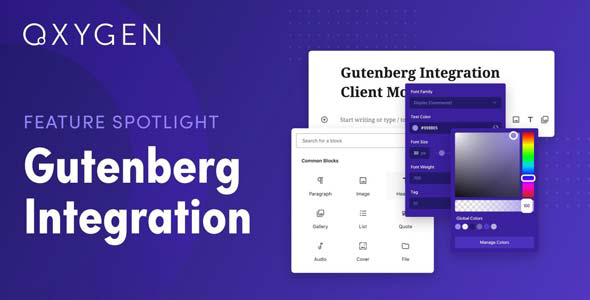
Oxygen Gutenberg Integration is the bridge that connects the Oxygen Builder visual builder with the native WordPress block editor, allowing both environments to coexist seamlessly within the same installation. Ideal for agencies and technical operators who need to edit content with Gutenberg blocks on sites built with Oxygen, this tool eliminates the structural incompatibility that normally forces users to choose between one editor or the other.
Introduction to Oxygen Gutenberg Integration
When a team builds its site with Oxygen Builder but needs the editorial or marketing team to use the WordPress block editor to publish content, friction is immediate: the two systems don't understand each other natively, leading to rendering conflicts, loss of styles, or broken content that consumes hours of manual correction.
This plugin acts as a compatibility layer, allowing you to activate Gutenberg on specific pages or posts without disrupting the architecture built with Oxygen. It's not a cosmetic solution, but a technical integration that respects the styles, templates, and logic of the visual builder while enabling the block editor where needed. The result is a real reduction in operational workload, because editorial workflows no longer depend on the developer to publish basic content.
A technician managing a medium-sized WooCommerce store can configure this extension so the content team can edit product descriptions or blog posts using Gutenberg blocks, while the checkout, cart, and account pages remain under the complete control of Oxygen Builder. No intermediate meetings, no delays due to technical dependencies, and no risk of breaking the conversion design.
Product overview
Editorial management on sites built with visual builders like Oxygen often creates a technical dependency that slows down daily operations: any content change requires access to the builder, specific training or developer intervention, which slows down the team's responsiveness and creates visible bottlenecks, especially during periods of high demand or marketing campaigns.
Without this module, the editorial team faces a stripped-down editing screen, lacking the block editor they're used to, or worse, they have access to the visual builder without the necessary training to use it without breaking layouts. With the tool active, the block editor appears where it should, respecting the contexts where Oxygen remains responsible for the structural design. The result is a streamlined editorial workflow, with clearly defined roles and no unnecessary technical interventions for tasks that should be routine.
- Without the add-on: Every time the content team needs to update a post or description, they have to wait for someone with access and training in Oxygen Builder to do it, creating delays and dependencies that scale poorly as the catalog or blog grows.
- With the active add-on: The block editor is enabled in the selected content types, allowing writers, catalog managers, or SEO managers to publish and edit without touching the visual builder or Oxygen templates.
- Observable result: The technical team recovers development time, the editorial team gains real autonomy, and the visual architecture of the site remains intact, without risk of accidental modifications to critical layouts such as the checkout or product pages.
Requirements and compatibility
Before incorporating this extension into the production environment, it is advisable to verify that Oxygen Builder is correctly configured as the main builder of the site and that the WordPress block editor has not been globally disabled by another tool or snippet, as both conditions directly affect the behavior of the integration.
- Primary dependency: Oxygen Builder must be present and active as the site builder; without it, this integration has no functional context to operate on.
- Operational compatibility with custom content types, standard posts, blog pages, and WooCommerce product pages where you want to selectively enable the block editor.
- It is advisable to conduct tests in a staging environment before applying configurations in production, especially if the site uses Oxygen templates on pages with active conversion flows such as checkout, upsells, or campaign landing pages.
Key benefits for your operation
- Editorial autonomy without technical risk: Content teams often get stuck on sites built with Oxygen because they lack familiar editing tools. This module enables the block editor where needed, without exposing the builder's templates to accidental modifications. The team can publish with confidence, and the technical team is no longer the bottleneck.
- Granular control by content type: Not all content needs the same editing environment. This extension lets you decide which pages or content types use Gutenberg blocks and which remain under Oxygen, giving administrators surgical control that avoids conflicts and maintains the site's visual consistency.
- Reduction of errors in publishing workflows: When editors work with tools they're not familiar with, formatting, structural, and content errors multiply. By giving them back the native block editor, the tool reduces the rate of editorial errors and the costs associated with subsequent corrections or poorly rendered content.
- Editorial scalability in stores with large catalogs: Managing hundreds of product descriptions in Oxygen Builder is inefficient by design. This plugin allows catalog managers to use blocks to enrich descriptions with tables, columns, galleries, and calls to action, without compromising the design of the product page built with Oxygen.
- Stability in critical conversion layouts: The checkout, cart, and account pages are areas where any accidental modification can impact the conversion rate. By keeping these pages under Oxygen's exclusive control while opening Gutenberg on the rest, the tool protects sales flows from unwanted interventions.
- Cleaner workflows in multi-project agencies: Teams managing multiple sites simultaneously need operational consistency. This plugin establishes a predictable model where the visual builder and block editor have defined roles, reducing the onboarding curve for new team members and minimizing confusion during handoffs.
Highlighted Features of Oxygen Gutenberg Integration
- Selective activation of Gutenberg by content type: The integration allows you to enable the block editor only for the content types defined by the administrator, without affecting the rest. In a WooCommerce store, this means that products, blog posts, or category pages can use blocks while the checkout and landing pages remain in Oxygen, maintaining the integrity of the conversion design.
- Preservation of Oxygen styles and templates: One of the most common problems when mixing builders is the loss of global styles or the appearance of CSS conflicts. This extension manages this coexistence so that Oxygen templates don't interfere with the rendering of Gutenberg blocks and vice versa, resulting in pages that look correct both on the front end and in the editor.
- Compatibility with third-party blocks: The Gutenberg block ecosystem includes SEO tools, pricing tables, testimonials, and forms that many teams already use. This module maintains that compatibility in contexts where Gutenberg is enabled, without requiring teams to give up the blocks that are already part of their workflow.
- User role management integrated with WordPress logic: Editing permissions respect WordPress's native role architecture, meaning that editors only access the block editor on content they have permission to access, without the integration opening unwanted access gaps to the visual builder.
- Consistent front-end rendering: The integration is not limited to the editing environment; it ensures that block-based content is correctly rendered on the front end without broken styles, duplicate containers, or conflicts with Oxygen's global scripts, which is especially relevant in product listings where visual presentation directly impacts conversion.
- Centralized configuration without the need for custom code: The integration parameters are managed from the admin panel, without requiring custom snippets or modifications to theme files. This reduces the risk of errors in future updates and makes it easy for any administrator with intermediate skills to adjust the settings without relying on the developer.
Who is this product for?
This plugin is designed for operators who already use Oxygen Builder as their primary builder but need other team members with less technical expertise to be able to edit content independently using the WordPress block editor. It's the natural solution when a site has grown to the point where maintaining the entire editorial workflow within Oxygen has become inefficient or dependent on a single person.
- Technical administrators and developers who need to establish clear boundaries between the visual builder environment and the editorial environment, maintaining full control over critical layouts without managing every content publication.
- Agencies and teams that manage multiple sites with Oxygen and need a consistent operating model that allows them to incorporate editors or content managers without specific training in the visual builder.
- Marketing, SEO, or catalog managers who work with Gutenberg blocks in their daily workflow and don't want to depend on the technical team to publish content on a site built with Oxygen Builder.
Real-world use cases
- WooCommerce store with extensive catalog and separate editorial team: A store with several hundred product references has a catalog management team that updates descriptions, adds specification tables, and enriches product pages with multimedia content. The problem is that the site is built with Oxygen, and the team has no training in the builder. With this module active, product pages use Gutenberg for the description area, while Oxygen continues to control the page layout. The catalog team works with the tools they are familiar with, and the pages maintain the established design without technical intervention.
- Corporate blog on a site built with Oxygen: The marketing department regularly publishes content on the blog, but each post requires developer intervention because the block editor is disabled. This creates delays that affect the publishing cadence and, consequently, the SEO strategy. By enabling Gutenberg exclusively for blog posts, the marketing team regains the autonomy it needs, and the developer stops receiving publishing requests that don't add technical value.
- Agency that manages multiple clients with Oxygen: An agency team delivers Oxygen-built websites to clients who then manage their own content. Without Gutenberg integration, each client needs training on the builder or relies on the agency for any changes. With this extension configured before delivery, clients gain access to a familiar editor, the agency reduces the volume of editorial support requests, and the site maintains the integrity of the delivered design.
- Campaign landing pages with sections editable by marketing: In a store that runs frequent campaigns, the marketing team needs to update copy, offers, and urgency blocks on specific pages without waiting for the developer. The page was built with Oxygen, but certain content areas can be made editable with Gutenberg blocks, giving marketing control over the message without the risk of altering the landing page's visual structure. The result is a more agile campaign cycle that is less dependent on the technical team's schedule.
Frequently Asked Questions about Oxygen Gutenberg Integration
Do I need to have Oxygen Builder installed for this to work?
Yes, this integration is specifically designed for environments where Oxygen Builder is the primary site builder. Without Oxygen active, the plugin lacks the context to operate within, as its function is precisely to manage the coexistence between the visual builder and the native WordPress block editor. If your site doesn't use Oxygen as its builder, this tool won't provide the benefit it was designed for, and you should consider other Gutenberg compatibility solutions.
Does this affect the end customer's experience at checkout or on product pages?
The impact on the front end depends on how the integration is configured. If the checkout and product pages are built and controlled by Oxygen, the end user won't notice any changes on those pages. Where there might be visible differences is in content areas where Gutenberg is enabled, such as the product description area, which can be enriched with additional blocks, improving the presentation without altering the main layout.
Can I use rules or conditions to activate the block editor only for certain content?
The integration allows you to configure which content types or contexts trigger the block editor, functioning as a selective activation rule. This means you can have Gutenberg available in blog posts, product descriptions, or specific pages, while the rest of the site remains under Oxygen's complete control. The exact granularity available depends on the module's configuration and should be tested in a test environment before deploying it to production.
Is there any impact on renewal or recurring payment flows for WooCommerce Subscriptions?
This extension operates at the content editing level, not in the payment logic or automatic renewal flows. Recurring billing, subscription management, and renewal notifications depend on the payment and subscription plugins you use in WooCommerce, not the content editing environment. However, if your account or subscription management pages are built with Oxygen, it's best not to enable Gutenberg in those areas to avoid rendering conflicts.
How does this tool affect coupons, taxes, or shipping settings?
This integration does not interact with WooCommerce's business logic related to coupons, tax rules, or shipping zones. Its scope is exclusively the content editing environment. However, if you use Gutenberg blocks to display shipping information, price tables including taxes, or coupon banners on product pages, the tool ensures that this content renders correctly without conflicts with the Oxygen layout.
Is site performance affected when used in stores with a high volume of products?
The integration itself doesn't introduce significant additional loads to the front end, as its main function occurs in the admin environment during editing. In stores with large catalogs, the actual performance impact depends more on the specific blocks used in product descriptions than on the integration itself. It's advisable to audit the size of the added blocks and ensure they don't load unnecessary resources on pages where Gutenberg is enabled.
Does it work correctly on WordPress multisite installations?
Behavior in multisite environments depends on the network configuration and whether Oxygen Builder is available at the network level or per individual site. In installations where each subsite has its own plugin configuration, the integration can be activated and configured independently on each site. For networks where plugins are centrally managed, it's advisable to verify that the integration configuration propagates correctly to each site before considering the environment stable.
How do I know if the integration is working correctly on my site?
A practical checklist for verifying functionality includes: checking that the block editor appears in the content types configured to use it, verifying that pages controlled by Oxygen do not display the block editor in the backend, checking that content created with blocks renders correctly on the front end without broken styles, and confirming that changes made by users with editor privileges do not affect layouts built with Oxygen. If the three points above are met without errors in the browser console, the integration is working as expected.

Written and reviewed by the PrimeGPL Team
At PrimeGPL, we ensure that every piece of published content is verified and reviewed by our team. We analyze features, compatibility, and performance to provide you with clear, up-to-date, and truly useful information for each product listed in our store.
Get your questions answered here
We answer your questions so you can buy in an informed and confident manner.
Does my purchase include updates?
Yes. Every product purchase includes lifetime updates, so you won't have to pay extra under any circumstances.
Is there a daily download limit?
No, not at all. After your purchase, you can download it as many times as you need, without any problem.
On how many websites can I use the products?
You can use your purchases on as many domains (websites) as you want, without any problems.
Does it include technical support?
Yes. We offer technical support Monday through Friday, during business hours UTC -3. This support includes assistance with issues related to download problems, installation problems, or errors with the purchased product.
Furthermore, support does not include configurations, customizations, tutorials, or services associated with the author.
Does my purchase have a warranty?
Yes, of course. If you have any problem that we can't solve, or if there's an external issue that doesn't have a general solution related to our service, you'll receive support and, if necessary, a full refund.
How do I access support?
After your purchase, from your user account, you can access the support section, where you can open a ticket and our team will assist you with whatever you need.
Download Previous Versions
If you have purchased this product, or have an active membership, you can download previous versions without any limits or restrictions.
| Product Name | Version | Size | Date | Download |
|---|---|---|---|---|
| Oxygen Gutenberg Integration | 1.4.4 | 0.02 MB | 22/05/2024 | Join Now |
Related Products
Below we show you different products that share the same category.