Divi Page Builder Everywhere

$79.00 Original price was: $79.00.$4.99Current price is: $4.99.
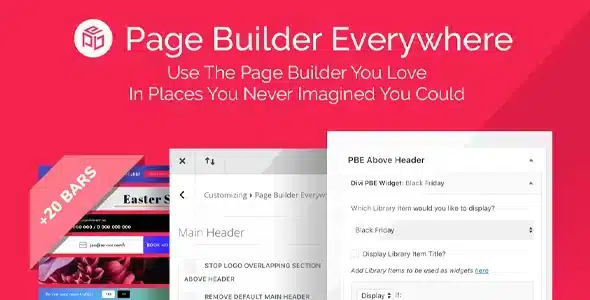
Extend the Divi builder to custom content types and areas of WooCommerce where it's not available by default, eliminating code dependencies to maintain visual consistency across the store.
Divi Page Builder Everywhere is an extension that removes the native restrictions of the Divi builder, allowing you to apply it to templates, custom content types, and areas of your site where it's not normally available. It's ideal for teams managing WooCommerce stores with complex visual flows. Divi must be active as your theme or base framework.
Introduction to Divi Page Builder Everywhere
This plugin solves a very specific friction that any administrator who works with Divi daily knows: the visual builder doesn't appear where you need it, forcing you to edit in code or duplicate efforts with partial solutions that don't scale or maintain well.
The technical nature of this extension lies in expanding the scope of the visual editor beyond the limitations imposed by Divi by default. It doesn't modify the core of the builder, but rather extends its registration capabilities so that the editor is available in additional contexts. This reduces visual consistency errors and eliminates the need for manual code interventions every time a new content type is added.
A technician managing a store with custom product categories, customer account pages, and campaign landing pages might encounter the problem that some of these areas are edited outside of Divi. With this module active, that same technician can apply the builder across all these contexts from a single interface, maintaining visual consistency without switching between tools.
Product overview
Divi Page Builder Everywhere acts on the visual content management layer of WordPress, extending the builder's reach into areas that directly affect the end-user experience and design consistency in stores that grow and diversify their content types.
Before implementing this tool, many operations followed a recognizable pattern: the design team built pages in Divi, but certain templates—such as order confirmations or category pages—were edited manually or with different tools. This led to visual inconsistencies, slowed down update cycles, and increased the risk of errors. By activating the plugin, the builder became available in those areas as well, unifying the workflow.
- Without the add-on: The team edits critical templates in PHP code or with secondary editors, which creates visual misalignment and dependence on technical profiles for changes that should be visual.
- With the active add-on: The Divi Builder appears in custom content types and previously inaccessible areas, allowing you to edit visually without touching code.
- Observable result: Shorter editing cycles, less dependence on the developer for design updates, and greater visual consistency across the store.
Requirements and compatibility
For this extension to function correctly, it's essential to have the Divi theme or framework active in the WordPress environment where it will be used; without this foundation, the visual builder that this module extends will not exist in the system. It's also advisable to verify compatibility with any other custom content type plugins you may have active.
- Functional dependency on Divi as a theme or as an active page-building framework on the site.
- Compatible with checkout areas, customer account pages, WooCommerce content types, and category or tag templates.
- In environments with many types of custom content or complex third-party integrations, it is advisable to validate behavior in a staging environment before replicating changes in production.
Key benefits for your operation
- Eliminating the technical bottleneck in design: When updating a template requires a developer, every campaign or UX change becomes a queue of support tickets. This plugin returns visual control to the content or design team, reducing reliance on technical staff for tasks that shouldn't require them.
- Visual consistency throughout the store: A store that uses Divi on some pages and different editors on others quickly accumulates design debt. Divi unifies the visual editing workflow, resulting in a more consistent user experience and fewer corrective revisions.
- Faster update cycles: Launching a campaign, updating a landing page, or modifying the checkout flow is no longer a process that takes days. With the builder now available where it wasn't before, changes are implemented in the same environment and with the same visual logic as the rest of the site.
- Scalability without added complexity: As a store grows and adds new types of content, this module adapts without requiring complex additional configurations. The team doesn't need to learn new tools every time a new section is added to the catalog or store flows.
- Reduction of visual errors in critical areas: Editing order confirmation templates or category pages outside the main builder is a common source of layout errors. By centralizing editing in Divi, you reduce the likelihood of a single change breaking the design in contexts that directly impact conversion.
- Operational control for distributed equipment: When multiple people manage different parts of a site, having a single visual editing environment simplifies coordination and reduces conflicts between parallel changes. This extension enables that control without adding extra management layers.
Highlighted Features of Divi Page Builder Everywhere
- Extending the builder to custom content types: Register the Divi visual editor on custom post types (CPTs) created by plugins or by the development team itself, allowing you to design these pages with the same visual impact as standard pages. In a store with specialized product pages or category-based landing pages, this changes the way the team produces content.
- WooCommerce template compatibility: It extends the builder to areas of the purchase flow that are typically outside the scope of Divi, such as account pages, order confirmations, or checkout access. This allows you to visually customize these critical points without relying on PHP hooks or specific child themes.
- Selective activation by content type: It doesn't force the builder in all contexts, but rather allows you to choose which areas to enable it in. This provides real operational control: the team decides where to apply Divi and where to maintain other editing workflows if necessary.
- Seamless integration with the Divi ecosystem: By functioning as an extension of the framework itself, it maintains the module, section, and row logic that the team already knows. It doesn't introduce an additional learning layer, which reduces the adoption curve for teams already working with Divi.
- Stability in production environments with active content: The module does not interfere with previously published content when activated, allowing it to be incorporated into existing stores without disrupting the end user experience.
- Compatibility with the WordPress review and publishing workflow: It maintains the native logic of drafts, revisions, and publication, meaning that design changes go through the same editorial control process as the rest of the site's content.
Who is this product for?
This plugin is designed for teams already using Divi as their core tool who find that certain areas of the site are beyond their control, leading to inconsistencies that accumulate with each update or campaign. It's not a solution for beginners, but rather for those already managing Divi who need more control over where they can apply it.
- Administrators and technicians who manage WooCommerce stores with multiple content types and need visual consistency without frequent code interventions.
- Agency teams or freelancers working on multiple projects simultaneously with Divi and need a consistent editing workflow across all site contexts.
- Marketing or UX professionals who rely on being able to visually edit key funnel pages—such as order confirmation or category pages—without being tied to a development cycle.
Real-world use cases
- Shop with expanded product listings: An electronics store creates a dedicated CPT for detailed technical specifications, but the editor for that type of content doesn't load Divi. The team has to build those pages in the classic editor, resulting in noticeable visual differences compared to the rest of the site. With this extension enabled, the builder becomes available in that CPT, and the technical specifications are designed with the same modules and styles as the main pages. The result is a consistent product experience that reinforces brand perception.
- Customizing the order confirmation page: A fashion store wants to add a recommended products block and a personalized message to the checkout page, but the template doesn't support Divi by default. With this module, the marketing team can visually edit the page, add upselling modules, and adjust the design without touching PHP. The click-through rate on recommended products after purchase improves because the block integrates seamlessly into the visual flow.
- Managing campaign landing pages in short cycles: A marketing team launches seasonal campaigns every few weeks and needs to create specific category pages for each one. Without visual access to these pages, each launch requires developer intervention. This plugin allows the team to create and update these pages directly in Divi, reducing production time and reliance on the technical backlog. The campaign launches on time and with a design that aligns with the rest of the site.
- Visual standardization across store network: An agency manages multiple stores for the same client across different environments, all using Divi. Some sites have additional custom page templates (CPTs) that don't support the builder, leading to differences in how projects are edited. With Divi Page Builder Everywhere applied consistently, all sites have the same visual editing flow, reducing coordination errors and making it easier for different team members to work on any project without having to relearn the environment.
Frequently Asked Questions about Divi Page Builder Everywhere
Does it work with any WordPress theme or do I need something specific?
This module relies on Divi being active in your environment, either as the main theme or as a framework. Without this foundation, the constructor it extends won't exist in the system, and the plugin will have no effect. If you're using a Divi child theme or Divi as a framework with another theme, compatibility depends on how that integration is configured in your specific environment. Validating it in a staging environment before deploying it to production is the safest practice.
Does anything change in the shopping experience for the end customer?
The impact on the end customer depends on how you use the new editing capabilities. The extension itself doesn't modify the functional behavior of the checkout or purchase flows, but it does give you visual control over pages you couldn't previously design with Divi. If you customize the order confirmation page or the customer account page, the end customer will see those design changes. The shopping experience isn't functionally altered; what changes is your ability to enhance it visually.
Can I apply rules or conditions to activate the constructor only in certain contexts?
The tool allows you to selectively activate the builder based on content type, which is already a form of conditional control. It doesn't manage dynamic rules based on user roles or session conditions, but it does let you decide which CPTs or areas of the store have the visual editor available in. For more advanced conditional logic within the design itself, you can combine it with the visibility options already offered by Divi in its modules.
Does it affect the subscription renewal process or recurring payments?
This module does not affect payment logic, renewals, or transaction processing workflows. Its scope is solely for the visual editing of back-end content. If your store manages subscriptions with WooCommerce Subscriptions or similar solutions, those workflows remain unchanged. What changes is your ability to visually design the pages related to those processes, such as the customer subscription management page or the failed renewal page.
Does it interfere with coupons, taxes, or shipping logic in WooCommerce?
No. This extension operates exclusively at the visual editing level and does not affect WooCommerce's business logic. Tax calculations, coupon application, and shipping rules function independently of the visual builder. The tool gives you access to visually edit pages related to these flows—such as checkout or order confirmation—but without altering how WooCommerce processes the underlying business logic.
Is store performance affected by expanding builder usage?
The performance impact depends on how the new editing capabilities are used, not the extension itself. Enabling Divi on more content types can increase the load of builder scripts on those pages if asset loading isn't handled correctly. For high-traffic stores, it's advisable to review how Divi loads its resources on newly enabled pages and ensure that the site's caching system also covers those areas.
Is it compatible with multisite environments or with managing multiple stores from a single installation?
Multisite compatibility depends on the environment's configuration and how Divi is deployed on the network. In principle, the module can function in multisite installations if Divi is correctly configured on each subsite, but behavior may vary depending on the network architecture. For teams managing multiple independent stores on separate installations, the extension works consistently across each site, making it easier to standardize the visual editing workflow across all projects.
How do I know if the plugin is working correctly in my environment?
The most direct sign is that the Divi Builder appears in content types or areas where it wasn't previously available. You can verify this by accessing the editing screen of a CPT you've enabled and checking that the Divi Edit button appears. Additionally, verifying that pages edited with the builder render correctly on the front end—especially on mobile and in checkout areas—is part of the basic validation checklist before considering the environment stable.

Written and reviewed by the PrimeGPL Team
At PrimeGPL, we ensure that every piece of published content is verified and reviewed by our team. We analyze features, compatibility, and performance to provide you with clear, up-to-date, and truly useful information for each product listed in our store.
Get your questions answered here
We answer your questions so you can buy in an informed and confident manner.
Does my purchase include updates?
Yes. Every product purchase includes lifetime updates, so you won't have to pay extra under any circumstances.
Is there a daily download limit?
No, not at all. After your purchase, you can download it as many times as you need, without any problem.
On how many websites can I use the products?
You can use your purchases on as many domains (websites) as you want, without any problems.
Does it include technical support?
Yes. We offer technical support Monday through Friday, during business hours UTC -3. This support includes assistance with issues related to download problems, installation problems, or errors with the purchased product.
Furthermore, support does not include configurations, customizations, tutorials, or services associated with the author.
Does my purchase have a warranty?
Yes, of course. If you have any problem that we can't solve, or if there's an external issue that doesn't have a general solution related to our service, you'll receive support and, if necessary, a full refund.
How do I access support?
After your purchase, from your user account, you can access the support section, where you can open a ticket and our team will assist you with whatever you need.
Download Previous Versions
If you have purchased this product, or have an active membership, you can download previous versions without any limits or restrictions.
| Product Name | Version | Size | Date | Download |
|---|---|---|---|---|
| Divi Page Builder Everywhere | 3.1.12 | 0.2 MB | 17/10/2023 | Join Now |
Related Products
Below we show you different products that share the same category.