Bijoux Jewelry Shop Theme

$90.00 Original price was: $90.00.$4.99Current price is: $4.99.
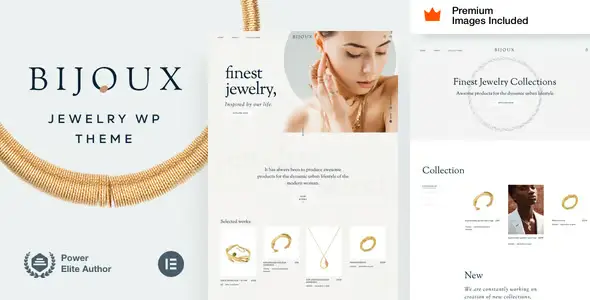
A specialized WordPress theme for jewelry stores that optimizes visual catalogs, product pages, and WooCommerce checkout, offering a stable and scalable foundation for managing jewelry collections with a clear structure and a polished UX.
Bijoux Jewelry Shop Theme is a premium WordPress theme designed for online jewelry stores, optimized for visual catalogs, product variations, and streamlined checkout flows. It's ideal for artisan jewelry brands, luxury boutiques, or curated marketplaces seeking a robust and stable visual foundation for WooCommerce.
Introduction to Bijoux Jewelry Shop Theme
This theme is geared towards creating jewelry stores with a focus on product photography, clear category architecture and a stylized checkout, improving navigation, exploration and purchase flows within WordPress and WooCommerce with a structure designed for medium to high ticket prices.
Technically, the tool functions as a specialized layout theme for small, detailed products, optimizing grids, typography, and visual hierarchies. It integrates specific templates for collections, product pages with variations (size, material, finish), and reusable blocks that reduce operational friction when designing campaigns or landing pages.
In a real-world scenario, a WordPress technician managing a jewelry store with a mixed catalog (rings, necklaces, bracelets) applies the Bijoux Jewelry Shop Theme, tests archive templates, reviews the mobile cart behavior, and adjusts microcopy at checkout. The result: fewer dependencies on heavyweight page builders and a more consistent checkout flow.
Product overview
This plugin acts on the visual and structural layer of the site, directly affecting the catalog experience, product listings, and checkout consistency, which impacts perceived stability, navigation clarity, and control over the presentation of collections in jewelry stores.
Previously, a small jewelry store used a generic theme with disorganized product listings and unclear galleries. With this tool, the developer applies collection templates, adds filters by material, and organizes product details into visual blocks. As a result, customers can find the type of piece they're looking for much faster.
- Step 1: Initial situation without the accessory. The jewelry store uses a generic theme with unremarkable images, difficult-to-read typography, and product descriptions without a clear information hierarchy.
- Step 2: Key action using a specific function. Specific catalog layouts are activated, columns are configured, the product gallery is adjusted, and sections are defined for descriptions, technical details, and cross-recommendations.
- Step 3: Observable results in operation (less friction, more control, fewer errors). The content team designs new collections with a repeatable workflow, customers better understand each piece, and support reports fewer questions about variations or materials.
Requirements and dependencies (without versions)
This module requires a functional WordPress environment and, to unleash its full potential, a properly configured WooCommerce installation with clear product types and well-defined taxonomies; it is advisable to check compatibility with other layout plugins and the parent or child theme before adopting it in production.
- Primary dependency (if applicable) expressed without versions. Requires WordPress and WooCommerce as the operating base to manage products, cart, and payments, and using a child theme is recommended if code customizations or deep template adjustments are anticipated.
- General compatibility (checkout, renewals, roles, taxes, shipping) depending on the tool type. The theme integrates with the standard checkout flow, respects tax rules, shipping methods, and coupons configured in WooCommerce, and allows you to show or hide visual elements based on the user's role using complementary plugins.
- Typical limitations or scenarios where it's advisable to test first (without being alarmist). In stores with many visual plugins (builders, sliders, advanced filters), it's recommended to set up a staging environment to validate product templates, responsive behavior, and potential style overlaps at checkout.
Key benefits for your project
- Visual architecture designed for jewelry. The Bijoux Jewelry Shop Theme prioritizes high-quality images, material details, and variation combinations, making it easier for administrators to organize complex collections without sacrificing performance or clarity on the product page.
- More efficient catalog workflows. This extension offers templates for categories, featured collections, and related products, reducing the time needed to set up new seasons or campaigns. Teams can replicate structures with fewer clicks and maintain a consistent design across pages.
- A brand-consistent checkout. The tool allows you to customize fonts, color palettes, and block layouts during the payment process, improving the sense of continuity between the product page and order confirmation. This reduces common friction points such as abrupt design changes.
- Improved internal content organization. Thanks to specific blocks and sections, content managers can separate emotional descriptions, technical details, jewelry care, and warranty policies. This organization facilitates regular updates without altering the overall design.
- Scalability for growing catalogs. As the store adds new collections or product lines, the theme maintains a stable structure where only taxonomies, filters, and banners are adjusted, avoiding constant redesigns and allowing the team to focus on product and logistics.
- A solid foundation for advanced customizations. Implementers and developers will find structured code, with distinct templates and clear styles, facilitating adjustments through child themes, snippets, and small overrides without breaking the main WooCommerce flow.
Highlighted Features of Bijoux Jewelry Shop Theme
- Specific templates for jewelry. Includes layouts designed to showcase small pieces with zoom, vertical galleries, and combinations of variations. This optimizes the visualization of details (settings, engravings, textures) and improves product understanding before checkout.
- Native integration with the WooCommerce structure. The plugin respects standard hooks and templates, making it easy to add stock badges, custom fields, or cross-sell blocks without workarounds, while maintaining compatibility with payment gateways and additional modules.
- Flexible visual customization options. It offers settings panels for colors, fonts, headers, and footers, avoiding reliance on heavyweight page builders. This reduces custom CSS and helps maintain a more consistent style base across the entire store.
- Responsive design optimized for mobile. The theme adjusts product grids, menus, and action buttons for smaller screens, helping users browse collections, manage their cart, and complete checkout from mobile devices with fewer unnecessary taps.
- Support for brand storytelling sections. Allows you to create collection pages with blocks for history, artisanal processes, and certifications. This reinforces the brand narrative and provides technical context about materials and origins, relevant in mid-range and high-end jewelry.
- Compatibility with widgets and filter blocks. It integrates with filtering systems by price, material, stone, or collection, improving internal search flows in large catalogs and helping advanced users quickly find the piece that fits their criteria.
Who is this product ideal for?
This module is especially suited to projects that need a refined visual environment for small, high-value items, where perceived quality, informational clarity, and stability of the WooCommerce purchase flow are critical factors for daily operations.
- Administrators who need order and traceability. People who manage catalogs with multiple simultaneous collections and require a clear template structure to track changes in product details without losing control of what has been modified and where.
- Teams with multiple projects and operational consistency. Agencies or freelancers who maintain several jewelry stores and want a replicable design pattern, with minimal adjustments between projects and a common foundation for catalog, shopping cart, and checkout processes.
- Implementers, designers, and marketing managers. Profiles that must align brand image, campaigns, and promotions with a consistent product experience, being able to create landing pages, temporary collections, and editorial sections without disrupting the standard purchase flow.
Practical use cases
- Custom ring boutique → problem: generic product sheets and lack of clarity in size and material variations → use of the extension: product layouts are configured with emphasis on size selector, zoom and technical description → result: fewer repetitive queries for size and composition.
- Handmade jewelry marketplace → problem: each author presents products differently and the catalog is perceived as disorganized → use of the tool: file templates, filters by type of piece and blocks of basic information are unified → result: more consistent navigation and less friction in the comparison between pieces.
- Luxury watch and jewelry store → problem: the mobile checkout experience leads to abandonment due to long and illegible forms → theme use: fonts, call-to-action buttons and spacing in the checkout flow are adjusted → result: clearer purchase process, with fewer perceived steps.
- Minimalist jewelry brand → problem: the marketing team is slow to design new campaigns and collections → use of the module: basic landing page and collection templates are created, with fixed blocks for storytelling and highlights → result: faster campaign launches with consistent design.
Frequently Asked Questions about the Bijoux Jewelry Shop Theme
What types of sites is this jewelry theme compatible with?
It primarily works with WordPress-based e-commerce and product catalog sites, especially when WooCommerce manages the cart flow, checkout, and inventory management, as well as visual catalogs with a high reliance on well-structured product photography.
It's suitable for single-brand jewelry stores, multi-brand boutiques, artisan marketplaces, and hybrid stores that combine jewelry with accessories. In corporate environments, it can act as a catalog front end connected to other management systems, provided WooCommerce receives the final product and stock data.
How does this issue affect the checkout experience and the overall UX?
The theme influences the checkout UX through templates and styles, improving field readability, step hierarchy, and visibility of key buttons, which reduces the feeling of friction in the payment process and reinforces visual consistency with product pages.
By using layouts focused on clarity, distractions are minimized and critical sections such as order summary, shipping methods, and payment options are highlighted. A consistent design between the catalog and checkout helps the user perceive the flow as secure and professional, increasing operational confidence.
Does it allow automation or specific rules linked to the store design?
This plugin does not create automations on its own, but it integrates with rules and automation plugins, offering clean templates where you can display conditional messages, badges, or dynamic blocks, without interfering with the logical operation of the rules applied to WooCommerce.
For example, you can use automatic discount tools or personalized recommendations and leverage the hooks that the theme respects to insert that content. It's advisable to test scenarios with test shopping carts to ensure that messages, notices, and banners appear where expected.
Does it have an impact on renewals or failed payments in stores with subscriptions?
The theme does not handle renewal or failed payment logic; that responsibility lies with the subscription plugins and the payment gateway. However, it does define how notifications, order statuses, and error messages are displayed on related pages.
In projects with subscription models, it's advisable to validate how renewals, reminders, and declined payment messages are displayed within account and order templates. Adjusting the text and design in these views can reduce support tickets when recurring payment issues arise.
How does it handle taxes, shipping, and coupons in the shopping cart?
The tool respects the tax, shipping method, and coupon settings configured in WooCommerce, only affecting the visual presentation of that information. It does not alter calculation rules or the logic for applying discounts or shipping rates.
In practice, you'll see that totals, tax lines, and coupon sections are displayed following the theme's style. It's important to test different combinations of taxes, coupons, and shipping with sample orders to ensure everything is clear and understandable for the end user.
Can it affect the performance or stability of the site?
Like any theme, its impact on performance depends on the combination with other plugins, the size of the images, and the hosting configuration, but Bijoux Jewelry Shop Theme is geared towards maintaining a reasonable structure for visual catalogs without unnecessarily overloading the frontend.
It's recommended to optimize images, use caching, and test the site with performance measurement tools. In very large stores, it can be helpful to disable non-essential aesthetic elements and review which scripts or styles are loaded in each template to find a balance between design and loading times.
Is it suitable for multisite or multi-store environments?
It can be used in multisite configurations, where several jewelry stores are managed under the same WordPress installation, provided that the infrastructure and network architecture are properly configured to support the load and maintenance.
In multi-store scenarios, each site can customize its colors, fonts, and visual settings while maintaining a common design foundation. Documenting a shared style guide is advisable to ensure consistency across projects and minimize long-term maintenance efforts.
How can I verify that it's working correctly in my store?
To verify that the theme works well, it is advisable to follow a basic checklist: review home pages, categories, products, cart, checkout and account; test forms, product variations, coupons and shipping methods with completed test orders.
Additionally, it's helpful to test on real mobile devices to confirm that the menus work, the text is legible, and there are no overlapping elements. A review with different user profiles (administrator, registered user, guest) helps identify potential points of friction before going live.

Written and reviewed by the PrimeGPL Team
At PrimeGPL, we ensure that every piece of published content is verified and reviewed by our team. We analyze features, compatibility, and performance to provide you with clear, up-to-date, and truly useful information for each product listed in our store.
Get your questions answered here
We answer your questions so you can buy in an informed and confident manner.
Does my purchase include updates?
Yes. Every product purchase includes lifetime updates, so you won't have to pay extra under any circumstances.
Is there a daily download limit?
No, not at all. After your purchase, you can download it as many times as you need, without any problem.
On how many websites can I use the products?
You can use your purchases on as many domains (websites) as you want, without any problems.
Does it include technical support?
Yes. We offer technical support Monday through Friday, during business hours UTC -3. This support includes assistance with issues related to download problems, installation problems, or errors with the purchased product.
Furthermore, support does not include configurations, customizations, tutorials, or services associated with the author.
Does my purchase have a warranty?
Yes, of course. If you have any problem that we can't solve, or if there's an external issue that doesn't have a general solution related to our service, you'll receive support and, if necessary, a full refund.
How do I access support?
After your purchase, from your user account, you can access the support section, where you can open a ticket and our team will assist you with whatever you need.
Download Previous Versions
If you have purchased this product, or have an active membership, you can download previous versions without any limits or restrictions.
| Product Name | Version | Size | Date | Download |
|---|---|---|---|---|
| No hay versiones anteriores registradas. | ||||
Related Products
Below we show you different products that share the same category.