
Skole Children Kindergarten Theme 49
$89.00 Original price was: $89.00.$4.99Current price is: $4.99.
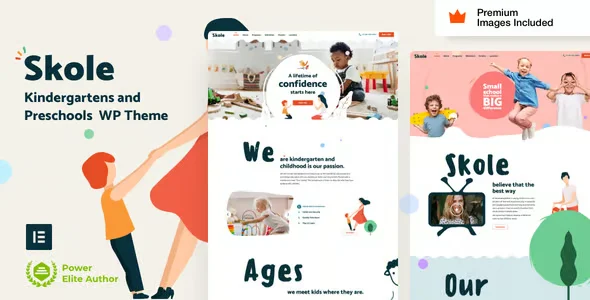
Skole Children Kindergarten Theme is a WordPress template designed specifically for preschools and kindergartens that need a professional, welcoming, and functional digital presence. Ideal for school directors, communications teams, and developers managing school websites, this theme eliminates the hassle of building from scratch and provides a cohesive visual architecture tailored to the real needs of family-oriented educational institutions.
Introduction to Skole Children Kindergarten Theme
Skole Children Kindergarten Theme is a WordPress design solution intended for children's educational institutions that need to communicate trust, warmth, and organization to families from the first click, eliminating the need to build a complex visual identity without a solid starting point.
This plugin integrates pre-designed page layouts tailored to the actual workflows of an educational institution: program presentations, teacher profiles, activity calendars, and contact or registration forms. Its architecture reduces the workload for the web administrator and minimizes layout errors that often occur when adapting generic themes to educational contexts.
Imagine a web developer tasked with setting up a website for a new daycare center before enrollment season. With this theme, they import the base demo, customize the colors and branding, and within hours have a navigable structure that already includes the sections families are looking for: what's taught, who teaches it, and how to contact them.
Product overview
The core functional area of Skole Children Kindergarten Theme encompasses design, content organization, and user experience for early childhood education sites, with a direct impact on the perception of trust and ease of management for teams without advanced technical backgrounds who need to keep the site up to date.
Before this tool was available, many schools opted to adapt multipurpose themes, which resulted in visual inconsistencies, sections that didn't fit with the school's structure, and a confusing editing experience for administrative staff. With this add-on, the process has tangibly changed.
- Without the add-on: The web administrator spends hours adapting generic widgets and templates to simulate sections of school curriculum or event calendar, with inconsistent and difficult-to-maintain visual results.
- With the active add-on: The pre-designed sections for program presentation, classroom gallery, teacher profiles, and enrollment calls to action are activated and customized from the no-code visual editor.
- Observable result: The site communicates institutional consistency, families find the information they need without friction, and the internal team can update content without depending on an external developer.
Requirements and compatibility
For Skole Children Kindergarten Theme to function optimally, you need an active WordPress installation and, depending on the features you want to use, at least one compatible page builder or the form and event plugins that the theme references in its dependency ecosystem.
- Main dependency: WordPress as the base CMS; some sections may require contact form or event management plugins to function fully.
- Areas of compatibility: institutional landing pages, registration or contact forms, multimedia galleries, parent testimonial sections, and conversion-oriented call-to-action blocks.
- Before deploying changes to production, it's advisable to validate compatibility with caching or image optimization plugins active in the environment, especially if the site already has published content and recurring traffic.
Key benefits for your operation
- Reduced start-up time: Building a school website from a generic theme takes days of layout work. This module offers ready-made structures for early childhood education that the team can customize in hours, freeing up time for higher-value tasks such as content strategy or setting up enrollment forms.
- Consistent user experience for families: Families visiting a daycare website seek clear information and a sense of trust. This tool visually organizes content with a hierarchy designed for this type of visitor, reducing abandonment rates and increasing inquiries received through the contact form.
- Editorial autonomy for the non-technical team: One of the most common problems in educational institutions is relying on an external developer to update the website. With this plugin, administrative staff can edit text, images, and sections directly from the dashboard without touching any code, resulting in a website that is always up-to-date.
- Visual consistency across multiple pages: Managing consistency between the homepage, program pages, and contact pages can become chaotic without a solid foundation. This theme ensures that all visual elements follow the same design logic, reducing layout errors and revision time.
- Mobile device compatibility: A significant proportion of families access the site from their mobile devices to check schedules or submit forms. The tool incorporates native responsive design, which eliminates the need for the technical team to manually adjust each section for small screens.
- Scalability for centers with multiple programs: If the educational center adds new classrooms, programs or teachers, the theme structure allows incorporating that content without breaking the existing layout, facilitating the growth of the site in parallel with institutional growth.
Key features of Skole Children Kindergarten Theme
- Pre-designed page templates for early childhood education: The theme includes specific layouts for presenting educational programs, teacher profiles, classroom galleries, and contact pages. This prevents the administrator from building each section from scratch, speeding up publishing time and reducing structural errors.
- Color palette and typography adapted to a children's audience: The colors and fonts are selected to convey a sense of connection and trust to families, while maintaining institutional professionalism. The administrator can customize the palette from the dashboard, but it's based on a visually consistent and effective design.
- Call-to-action sections geared towards enrollment: The tool incorporates specific blocks to guide families to the registration or contact form, with a conversion logic integrated into the design that the team can activate or deactivate depending on the season.
- Multimedia gallery optimized to showcase the center's surroundings: Families make decisions based on what they see. This module includes a gallery designed to visually and clearly display classrooms, outdoor spaces, and activities, without requiring complex external gallery plugins.
- Compatibility with popular page builders: The extension is designed to work with the main builders in the WordPress ecosystem, allowing developers or web technicians to take advantage of the theme without abandoning their usual editing tools.
- Native responsive design without additional configuration: All sections automatically adapt to different screen sizes. The administrator doesn't need to create separate mobile versions, which reduces maintenance time and ensures a seamless experience regardless of the device used by visiting families.
Who is this product for?
This topic is especially valuable for communications managers or school principals who need a functional and attractive website without relying on a full-time external design team. It's also very useful for developers or freelancers who create websites for clients in the education sector and need a solid and adaptable starting point.
- Administrators or technicians who manage the center's website and need editorial control without excessive technical complexity.
- Teams that manage multiple web projects for educational institutions and need a reusable and consistent foundation across projects.
- Communication or educational marketing managers who depend on the site conveying trust and facilitating registration inquiries for new families.
Real-world use cases
- New daycare launch ahead of enrollment season: A newly opened center needs a website in just a few weeks to attract families before visits begin. The team imports the theme demo, customizes the text and brand colors, and publishes a complete site with sections for programs, faculty, and a contact form. Families arrive at the open house having already reviewed all the relevant information.
- Updating the website of a center with an outdated image: A long-established daycare center has a website that no longer reflects its current educational approach. The communications manager applies this approach to the existing site, reorganizes the content using new templates, and obtains a refreshed website without losing the content history or needing a complete redesign.
- Agency that manages websites for multiple educational institutions: A freelance developer manages the websites for several schools and daycare centers. Using this plugin as a foundation for all of them ensures consistent project quality, reduces initial setup time, and simplifies recurring maintenance, as all sites share a similar structural logic.
- Center that incorporates new programs and needs to expand its site: A daycare center adding an early stimulation program needs a new section on its website without disrupting the existing layout. Using the theme's structure, the administrator can duplicate a program template, adapt the content, and publish the new section in minutes, maintaining visual consistency with the rest of the site.
Frequently Asked Questions about Skole Children Kindergarten Theme
Does this theme work with any WordPress installation or does it require specific plugins?
The theme is built on WordPress and doesn't require any plugins to display its core design. However, some functional sections, such as signup forms and event calendars, rely on additional plugins, which the theme typically references in its documentation. It's advisable to review these dependencies before publishing to ensure all sections function as expected in the client's environment.
How does this issue affect the experience of families visiting the site from their mobile devices?
Responsive design is natively integrated, meaning sections automatically reorganize for smaller screens without any additional setup. Families accessing the site from mobile devices will find menus, forms, and galleries properly adapted, reducing friction and increasing the likelihood that they will complete an inquiry or information request.
Can I configure specific rules or conditions to display different content depending on the educational program?
The theme itself doesn't natively incorporate advanced conditional logic, but its compatibility with page builders and content rule plugins allows you to configure scenarios where different sections are displayed based on program type, student age, or other criteria defined by the administrator. The tool provides the visual structure; the conditional logic is managed through the corresponding add-on plugins.
Does this issue have any relation to recurring payments or school fee management?
No, this theme does not handle payments or renewals. Its sole function is the visual presentation and organization of the site's content. To manage fees, paid enrollments, or recurring renewals, you would need to integrate payment plugins or WooCommerce with the corresponding configurations, which operate independently of the design layer provided by this module.
Does the theme include sections for displaying program prices or managing family discount coupons?
The theme can include static pricing sections designed to clearly communicate rates to families. However, dynamic management of coupons, discounts, or variable prices requires integration with WooCommerce or other pricing management systems. The theme acts as a presentation layer; the business logic is configured in the integrated e-commerce plugins.
How does the theme perform on sites with a lot of multimedia content or a high volume of visits?
The site's performance with this theme largely depends on server configuration, active caching plugins, and the size of uploaded media files. The theme itself is designed with a clean structure that doesn't add unnecessary load, but in high-traffic environments or with very large galleries, it's advisable to complement it with an image optimization plugin and a well-configured caching solution to maintain adequate loading times.
Can I use this theme on multiple school sites from a multisite installation?
WordPress multisite compatibility is generally possible, although it's advisable to verify that the theme dependencies and associated plugins also support this environment before deploying it to production. For agencies or developers managing networks of educational websites, this option can be efficient, but it requires prior technical validation in a test environment to avoid conflicts between subsites.
How can I verify that the theme is working correctly once it's published?
A practical checklist for validating functionality includes: verifying that all pre-designed sections display correctly on desktop and mobile, checking that contact forms send and receive messages without errors, ensuring that galleries load images without display issues, confirming that navigation menus work on all devices, and validating that calls to action redirect to the correct pages. If any of these points fail, it's usually related to a plugin conflict or an unactivated dependency.
Short description
Skole Children Kindergarten Theme offers children's educational centers a professional and adaptable visual structure that reduces site setup time and allows the team to update content without relying on external development.

Written and reviewed by the PrimeGPL Team
At PrimeGPL, we ensure that every piece of published content is verified and reviewed by our team. We analyze features, compatibility, and performance to provide you with clear, up-to-date, and truly useful information for each product listed in our store.
Get your questions answered here
We answer your questions so you can buy in an informed and confident manner.
Does my purchase include updates?
Yes. Every product purchase includes lifetime updates, so you won't have to pay extra under any circumstances.
Is there a daily download limit?
No, not at all. After your purchase, you can download it as many times as you need, without any problem.
On how many websites can I use the products?
You can use your purchases on as many domains (websites) as you want, without any problems.
Does it include technical support?
Yes. We offer technical support Monday through Friday, during business hours UTC -3. This support includes assistance with issues related to download problems, installation problems, or errors with the purchased product.
Furthermore, support does not include configurations, customizations, tutorials, or services associated with the author.
Does my purchase have a warranty?
Yes, of course. If you have any problem that we can't solve, or if there's an external issue that doesn't have a general solution related to our service, you'll receive support and, if necessary, a full refund.
How do I access support?
After your purchase, from your user account, you can access the support section, where you can open a ticket and our team will assist you with whatever you need.
Download Previous Versions
If you have purchased this product, or have an active membership, you can download previous versions without any limits or restrictions.
| Product Name | Version | Size | Date | Download |
|---|---|---|---|---|
| No hay versiones anteriores registradas. | ||||
Related Products
Below we show you different products that share the same category.




