FooEvents Calendar Plugin
$29.00 Original price was: $29.00.$4.99Current price is: $4.99.
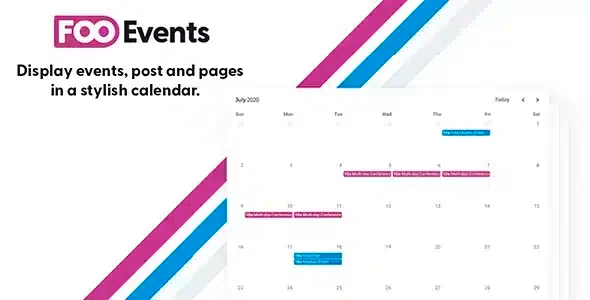
This plugin transforms FooEvents' event management into an interactive calendar view within WooCommerce, shortening the path between offer discovery and checkout through visual date navigation.
The FooEvents Calendar Plugin is a WooCommerce extension that transforms event management into a navigable calendar view, allowing store operators to organize, filter, and display multiple events with dates without relying on static lists. Ideal for businesses with recurring or complex scheduling, its native integration with FooEvents for WooCommerce eliminates friction between ticket offerings and the purchase experience.
Introduction to the FooEvents Calendar Plugin
FooEvents Calendar Plugin is the add-on that turns a catalog of scattered events into an interactive calendar interface within WooCommerce, eliminating the need for the customer to navigate through product pages without temporal context to find the date they are interested in.
The tool operates directly on the FooEvents architecture, leveraging pre-configured event data and projecting it onto a navigable monthly grid. This reduces support team inquiries regarding availability and centralizes the purchasing experience into a single visual touchpoint.
An administrator who manages weekly workshops, for example, can insert the calendar using a shortcode on any page, and the customer will see each session as a clickable event with direct access to the checkout, without unnecessary intermediate steps.
Product overview
This module addresses one of the biggest reasons for abandonment in event stores: the customer's difficulty in identifying when each product occurs, what dates are available, and how to quickly reach the purchase process without losing the temporal context.
Before implementing this plugin, a store with ten or twenty active events required visitors to browse individual product pages to compare dates. With the extension active, all events are automatically mapped to the calendar according to their FooEvents settings, grouping sessions for the same product and visually differentiating sold-out dates.
- Without the add-on: The customer has no visual reference of the events calendar, which generates confusion, repeated visits, and abandonment before checkout.
- With the active add-on: Each event appears on its corresponding date within a navigable monthly view, with direct access to the purchase page upon clicking.
- Observable result: The flow from discovery to checkout is shortened, the load of availability queries decreases, and the presentation of the offer gains temporal consistency.
Requirements and compatibility
For this add-on to work correctly, it is essential to have the main FooEvents for WooCommerce plugin active, as this extension depends entirely on its data structure to read, classify and display events in the calendar; without that foundation, the module has no information to process.
- Direct functional dependency on FooEvents for WooCommerce: without it, the calendar has no data to display or structure to operate on.
- Compatible with pages, posts, and templates from common page builders via shortcode; revisable depending on the active theme and its compatibility with blocks or widgets.
- It is advisable to validate the behavior in a test environment when the store uses aggressive caching or optimization plugins that may interfere with the dynamic rendering of the calendar.
Key benefits for your operation
- Reduction in availability inquiries: When customers struggle to find available dates, the team receives time-consuming, repetitive emails and messages. This plugin centralizes that information visually, allowing visitors to resolve their queries without human intervention and reach checkout with a greater intention to purchase.
- Improved discovery-to-purchase flow: Forcing customers to navigate through individual products to compare dates increases abandonment rates. This tool presents all events in a single, navigable view, shortening the path from initial interest to completed transaction.
- Coherent presentation of complex programs: Managing recurring events, weekly workshops, or multiple sessions of the same product without a unified view creates internal and external confusion. This module automatically groups and organizes that complexity without requiring additional manual work from the administrator.
- Greater visual control over the date inventory: Identifying which dates are sold out, which have low occupancy, or which are coming up soon is difficult from the back office without visual tools. The calendar offers an immediate representation of the availability status, useful for both the customer and the operator.
- Flexible insertion at any point on the site: Limiting the calendar to a single page reduces its impact. This extension allows you to place it via shortcode on category pages, landing pages, or even areas of the homepage, adapting the experience to the store's content strategy.
- Brand consistency without custom development: Building a custom calendar view requires custom development and ongoing maintenance. This plugin delivers that functionality natively within the FooEvents ecosystem, maintaining visual consistency without relying on external code.
Key features of the FooEvents Calendar Plugin
- Navigable monthly view: The calendar displays events organized by month with navigation controls to previous and subsequent months. This allows the client to plan ahead and the operator to display long-term schedules without modifying the site's structure.
- Direct link to the WooCommerce product: Each event on the calendar is a functional link to its product page, where the customer can view details, select options, and complete the purchase. The journey from discovery to checkout is seamless and free of unnecessary redirects.
- Visual differentiation of event states: The add-on visually distinguishes between available and sold-out dates on the calendar. This signal reduces missed purchases due to incorrect expectations and improves the store's perceived transparency.
- Multi-date event support: FooEvents allows you to configure products with multiple sessions or independent dates, and this module correctly represents them in the calendar without duplications or mapping errors, which is essential for workshops, courses, or events with multiple days.
- Implementation using shortcode: The calendar can be inserted into any page or template using a standard shortcode, eliminating the need to edit theme code or create custom templates. This gives administrators the autonomy to decide where the calendar appears without relying on the technical team.
- Dynamic update based on FooEvents data: The calendar reflects in real time any changes made to events from the WooCommerce back office. If a date sells out or a new session is added, the change appears on the calendar automatically.
Who is this product for?
This add-on is designed for operators already using FooEvents who need to offer their customers a clear way to explore their schedule without relying on cluttered product lists. It's especially valuable when the offering includes multiple dates, recurring sessions, or side events that are difficult to communicate in a traditional store format.
- Administrators or technicians who need to centralize the display of events and reduce the burden of queries about availability and dates.
- Teams that manage multiple simultaneous event streams and need a consistent presentation that scales without additional manual work.
- UX or marketing managers who seek to shorten the path between discovering the offer and making a purchase decision through a more intuitive visual experience.
Real-world use cases
- Training academy with monthly courses: An online academy offers workshops every week on different dates depending on the level. Without a calendar view, students have to open each product separately to check the dates, leading to confusion and abandonment. With this extension, all workshops appear on the calendar by date, allowing students to select the session that suits them and reach checkout in a single click. The result is a smoother shopping experience and a more predictable booking process.
- Cultural space with seasonal events: A cultural center programs concerts, exhibitions, and talks throughout the year. Presenting that variety in a product list doesn't convey the richness of the programming. The calendar visually groups all the offerings by month, allowing visitors to browse the entire season and discover events they wouldn't have actively sought out. The store transforms exploratory visits into purchases that wouldn't have happened before.
- Leisure activities company with sold-out sessions: An experiential business has high-demand sessions that sell out quickly. Without visual cues, customers try to book fully booked dates and contact the team when the system rejects them. With the plugin displaying sold-out dates on the calendar, expectations are managed before checkout, and the team stops handling avoidable complaints.
- Organizer of multi-day conferences: A three-day conference sells tickets for each day as separate products in WooCommerce. Potential attendees need to see all three dates in context to decide which days to attend. The calendar displays each day on its corresponding date, allowing attendees to compare and select from a single view, and resulting in a more informed purchase pattern and fewer returned tickets.
Frequently Asked Questions about the FooEvents Calendar Plugin
Does this plugin work with any WooCommerce configuration or does it require something specific to be enabled?
For the calendar to function correctly, the main FooEvents for WooCommerce plugin must be active and have events configured. Without this foundation, the module has no data to process and no structure on which to build the view. Beyond this dependency, it works within the standard WooCommerce ecosystem, although it's advisable to check compatibility with the active theme if using highly customized page templates, as the shortcode requires a standard content area to render correctly.
How does this add-on affect the customer experience during the purchasing process?
The most direct impact is the reduction in steps between discovery and checkout. Instead of navigating individual product pages to find an available date, the customer sees all events on the calendar, selects the one they're interested in, and goes directly to the purchase page. This improved flow clarity reduces friction before checkout and decreases abandonment due to time confusion.
Can the calendar display only certain events or does it automatically filter based on some rule?
The extension maps events configured in FooEvents and displays them on the calendar according to their assigned dates. The logic behind what appears depends on how the products are structured in FooEvents, including sold-out dates, which are visually differentiated. It doesn't natively include filters by category or event type in all versions, so operators with highly diverse schedules should evaluate whether this level of granularity is sufficient for their needs.
How does the calendar handle events with failed payments or unconfirmed tickets?
The calendar reflects the event inventory status based on what FooEvents records in WooCommerce. Pending orders or orders with failed payments do not automatically release the slot until the system resolves them according to the WooCommerce settings. This means that availability visibility on the calendar depends directly on the proper management of the order flow in the back office, especially for events with limited capacity.
Do WooCommerce coupons or discounts work normally when buying from the calendar?
The calendar acts as a visual entry point, not a pricing engine. Clicking on an event takes the customer to the standard WooCommerce product page, where the checkout process works with all the usual logic, including coupons, quantity discounts, and active promotions. The tool doesn't alter or intercept that flow, so promotion compatibility is the same as for any other product in the store.
Is site performance affected when there are many active events on the calendar?
With high event volumes, any dynamic view can place additional load on the database. This plugin queries data from FooEvents to build the view, so stores with dozens of concurrent events should pay attention to their cache configuration and database efficiency. There are no absolute performance guarantees, but optimizing object caching and reviewing database indexes are reasonable preventative measures before scaling the event catalog.
Is this plugin viable in a multisite installation or for managing multiple calendars for different stores?
In multisite environments, each subsite operates with its own instance of FooEvents and WooCommerce, so each store's calendar only reflects the events of that specific installation. There is no centralized view that consolidates events from multiple sites into a single calendar. For agencies or managers of multiple stores, this means managing each instance separately, which is functional but requires individual access to each environment.
How can I verify that the calendar is working correctly after setting it up?
A practical way to validate functionality is to create a test event in FooEvents with a specific date and verify that it appears on the calendar on the correct day, with the active link to the product page. It's also advisable to confirm that sold-out dates are visually differentiated and that the shortcode renders correctly on the page type where it's inserted. Checking the behavior on mobile devices is helpful, as the calendar view may behave differently on smaller screens depending on the active theme.

Written and reviewed by the PrimeGPL Team
At PrimeGPL, we ensure that every piece of published content is verified and reviewed by our team. We analyze features, compatibility, and performance to provide you with clear, up-to-date, and truly useful information for each product listed in our store.
Get your questions answered here
We answer your questions so you can buy in an informed and confident manner.
Does my purchase include updates?
Yes. Every product purchase includes lifetime updates, so you won't have to pay extra under any circumstances.
Is there a daily download limit?
No, not at all. After your purchase, you can download it as many times as you need, without any problem.
On how many websites can I use the products?
You can use your purchases on as many domains (websites) as you want, without any problems.
Does it include technical support?
Yes. We offer technical support Monday through Friday, during business hours UTC -3. This support includes assistance with issues related to download problems, installation problems, or errors with the purchased product.
Furthermore, support does not include configurations, customizations, tutorials, or services associated with the author.
Does my purchase have a warranty?
Yes, of course. If you have any problem that we can't solve, or if there's an external issue that doesn't have a general solution related to our service, you'll receive support and, if necessary, a full refund.
How do I access support?
After your purchase, from your user account, you can access the support section, where you can open a ticket and our team will assist you with whatever you need.
Download Previous Versions
If you have purchased this product, or have an active membership, you can download previous versions without any limits or restrictions.
| Product Name | Version | Size | Date | Download |
|---|---|---|---|---|
| FooEvents Calendar | 1.7.14 | 1.6 MB | 01/12/2025 | Join Now |
Related Products
Below we show you different products that share the same category.