Bookly PRO WordPress Plugin
$99.00 Original price was: $99.00.$4.99Current price is: $4.99.
Professional booking system for WordPress that automates scheduling, payments, and notifications, eliminating manual appointment management and reducing operational errors from day one.
Bookly PRO WordPress Plugin is the most comprehensive booking system for WordPress sites offering appointment-based services. Designed for businesses that can't afford to manage appointments manually, it centralizes scheduling, payments, and automatic notifications in a single environment. Ideal for clinics, studios, academies, or any time- and availability-based business. Requires an active WordPress installation as the base platform.
Introduction to Bookly PRO WordPress Plugin
Bookly PRO WordPress Plugin transforms the way a WordPress site manages appointments and bookings, eliminating the usual friction between supplier availability, customer intent, and the administrative record that often becomes out of sync when everything is done manually or with generic forms.
Technically, this plugin operates as a time management layer integrated into the WordPress back office. Each booking generates a structured record, updates availability in real time, and can trigger automatic notifications without human intervention. This reduces double booking errors and eliminates the time the team spends confirming appointments by phone or email.
Imagine a clinic manager who receives bookings through three different channels and manually consolidates them in a spreadsheet. With this tool, the website form automatically manages availability, assigns the appropriate professional, and sends automatic reminders. The manager goes from managing chaos to overseeing a streamlined workflow.
Product overview
The functional area of Bookly PRO WordPress Plugin ranges from frontend booking capture to internal calendar management, payments and communications, with a direct impact on operational stability and the end customer experience, especially in businesses that scale their appointment volume.
Before implementing this module, many operators struggled with contact forms that didn't validate availability, external calendars disconnected from the website, and a back office that didn't reflect the actual status of appointments. The team spent time manually synchronizing data, confirming bookings, and managing cancellations. With this tool, that workflow is automated from the customer's first click.
- Without the add-on: The team manages availability manually, with a constant risk of overlaps, unconfirmed bookings, and notifications that depend on someone remembering to send them.
- With the active add-on: The system validates real-time availability, assigns resources or professionals according to predefined rules, and triggers automatic notifications by email or SMS when confirming, modifying, or canceling an appointment.
- Observable result: Less administrative time, zero double bookings, and a seamless booking experience that the customer perceives as professional from the first contact.
Requirements and compatibility
For this extension to function correctly, you need an active and configured WordPress installation; it's advisable to check compatibility with your active theme, caching plugins, and any payment gateway solution before deploying it in a production environment with real traffic.
- It relies on WordPress as the base platform; some payment flows are enhanced if integrated with WooCommerce or other compatible gateways declared by the provider.
- Compatible with checkout flows with integrated payment, staff role management, multiple service configuration, discount coupons, and email and SMS notifications.
- On sites with aggressive caching plugins or highly customized themes, it is advisable to validate the behavior of the booking form in a staging environment before activating it in production.
Key benefits for your operation
- Elimination of repetitive administrative work: Managing appointments manually consumes hours that the team could dedicate to higher-value tasks. This module automates the confirmation, reminder, and status updates for each booking, freeing the team from repetitive tasks that are also prone to human error.
- Full control over real-time availability: One of the most frequent headaches for businesses with multiple professionals or resources is appointment scheduling. This tool updates availability with each confirmed booking, so the client never sees a slot that's already filled, and the team doesn't need to manually synchronize anything.
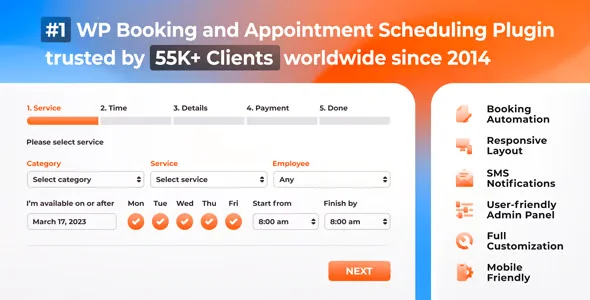
- Seamless booking experience for the end customer: A confusing or slow booking process is enough to make a potential customer abandon their reservation before confirming. This plugin offers a clear, step-by-step flow with integrated service selection, professional, date, and payment, reducing abandonment and improving direct conversion.
- Automatic notifications that reduce absences: Missed appointments due to forgetfulness represent a real cost for any service business. This extension sends automatic reminders via email or SMS at pre-set times, reducing no-shows without any manual intervention.
- Scalability without a proportional increase in operating load: When the volume of bookings increases, the system absorbs that growth without requiring additional administrative staff. The allocation, notification, and registration logic works the same for ten appointments as it does for two hundred, allowing the operation to scale sustainably.
- Traceability and centralized management data: Knowing which services are booked most, which professionals are in highest demand, or how many cancellations occur during certain periods is valuable information. The back office of this tool centralizes this data in a single dashboard, without the need to export or cross-reference external sources.
Key features of Bookly PRO WordPress Plugin
- Management of multiple services and professionals: The system allows you to configure a service catalog with differentiated durations, prices, and staff assignments. In a clinic with several specialists, this means that each booking automatically reaches the correct professional, without manual intervention.
- Payments integrated into the booking flow: The customer can pay at the time of booking, reducing last-minute cancellations and ensuring commitment from the outset. Integration with compatible payment gateways allows for managing partial deposits or full payments, depending on the business's configuration.
- Customizable booking form for the frontend: The form's visual appearance and fields are tailored to the site's identity, preventing it from feeling like an embedded external component. This visual consistency improves customer confidence in the process and reduces abandonment during the booking step.
- Configurable notifications and reminders: The operator defines when and how the system communicates with the customer and staff. A 24-hour reminder, immediate confirmation, and cancellation notification are workflows that are configured once and run autonomously indefinitely.
- Administration panel with agenda view and filters: The back office offers a calendar and list view with filters by service, professional, or date. The team can view the status of each appointment, modify it, or cancel it from the same environment, without needing external tools.
- Group support and maximum capacity per service: Some services are offered in groups, such as classes or workshops. This extension allows you to define a maximum capacity per session, so the system automatically closes availability when the limit is reached, without requiring manual intervention.
Who is this product for?
This plugin is designed for appointment-based service businesses that already have a WordPress presence and want to move beyond manually managing their schedules or using workarounds. It's not for those looking for something basic: its true value emerges when the business has high volume, multiple services, or several team members.
- Administrators or technicians who need total control over availability, resource allocation, and logging of every customer interaction.
- Teams that manage multiple WordPress projects or sites with different services and need a consistent and scalable solution for each one.
- Marketing or UX managers who rely on a clean booking process to improve conversion and customer experience from the first contact.
Real-world use cases
- Physiotherapy clinic with several professionals: The clinic used to receive bookings by phone and email, and the administrative team manually updated each physiotherapist's schedule. With this new module, clients select the professional, service, and available time slot from the website, pay the deposit in the same process, and receive automatic confirmation. The clinic eliminated confirmation calls and reduced no-shows thanks to automated reminders.
- Language academy with group classes: Managing class capacity and closing registration when it reached full was a manual, error-prone task. With this tool, each session has a pre-set limit; when that limit is reached, the class is automatically removed from the form. Coordinators have gone from manually managing waiting lists to overseeing a system that does it automatically.
- Photography studio with services of varying durations: The studio offered portrait, product, and corporate sessions with varying durations and prices, making a generic calendar impossible. With this add-on, each session type has its own duration, price, and availability. Clients book the exact service they need, and the studio never misses a slot or overbookes.
- Wellness center with various treatments and specialized professionals: Manually assigning each booking to the correct professional based on the chosen treatment led to confusion and frequent errors. With this module's assignment logic, each service is linked to the professionals who can perform it, and the system automatically assigns based on availability. The center reduced assignment errors and improved customer satisfaction by ensuring that the correct professional always attends to the client.
Frequently Asked Questions about the Bookly PRO WordPress Plugin
Which WordPress environment do I need for it to work correctly?
The plugin requires a fully functional and up-to-date WordPress installation. Some of its more advanced features, such as integrated payment processing, are enhanced with WooCommerce or other compatible payment gateways. Before deploying it to a live environment, it's advisable to verify that there are no conflicts with the active theme or caching or security plugins that could interfere with the booking form. A staging test helps prevent surprises in the live environment.
How does this system affect the booking process experienced by the end customer?
The customer experiences a seamless, step-by-step flow: they select the service, choose the professional if applicable, select an available date and time, and complete the payment if enabled. Everything happens on the same site, without any unexpected redirects or generic forms. This consistency reduces abandonment during the process and conveys professionalism from the very first click. The improved experience directly enhances the booking completion rate.
What kind of automations can I set up with this tool?
The tool allows you to configure automatic email and SMS notifications for confirmations, pre-appointment reminders, and cancellation or modification alerts. You can also define staff allocation rules based on the selected service and set maximum session capacities that are updated in real time. These automations run continuously without manual intervention once configured.
What happens if a payment fails during the booking process?
When payment is not completed, the booking is not confirmed in the system, preventing a slot from being blocked without guaranteed attendance. The customer receives a notification of the failure and can retry the process. The operator has visibility of failed attempts from the administration panel, allowing for tracking without needing to review external records.
Is it possible to apply coupons or discounts to reservations?
The system supports discount coupons that the operator can configure for specific services or periods. This allows for controlled promotions without altering the base prices of the services. Integration with WooCommerce expands the possibilities for managing prices, discounts, and taxes according to the business's tax regulations and the region in which it operates.
How does the system behave when the volume of reserves grows significantly?
The plugin's architecture is designed to handle a growing volume of bookings without degrading the user experience. Availability is updated in real time to avoid overlaps, and notifications are handled asynchronously when the server configuration allows. That said, final performance also depends on the quality of the hosting and the overall site configuration, so in high-volume operations, it's advisable to audit the entire environment.
Does it work correctly in multisite installations or with multiple WordPress projects?
The module can be used independently on different WordPress installations, making it suitable for agencies or teams managing multiple projects. In WordPress multisite setups, behavior may vary depending on the network architecture, so it's advisable to validate the entire workflow in that environment before deploying it to all subsites. Each installation manages its own bookings, services, and settings autonomously.
How can I tell if the system is working as it should after setting it up?
A practical way to validate it is to make a complete test booking from the frontend: select the service, date, professional, and complete the payment if applicable. Verifying that the appointment appears correctly in the admin panel, that notifications reach both the client and the staff, and that availability is updated in real time are the three key indicators. If all three steps work without manual intervention, the system is operational and ready for production.

Written and reviewed by the PrimeGPL Team
At PrimeGPL, we ensure that every piece of published content is verified and reviewed by our team. We analyze features, compatibility, and performance to provide you with clear, up-to-date, and truly useful information for each product listed in our store.
Get your questions answered here
We answer your questions so you can buy in an informed and confident manner.
Does my purchase include updates?
Yes. Every product purchase includes lifetime updates, so you won't have to pay extra under any circumstances.
Is there a daily download limit?
No, not at all. After your purchase, you can download it as many times as you need, without any problem.
On how many websites can I use the products?
You can use your purchases on as many domains (websites) as you want, without any problems.
Does it include technical support?
Yes. We offer technical support Monday through Friday, during business hours UTC -3. This support includes assistance with issues related to download problems, installation problems, or errors with the purchased product.
Furthermore, support does not include configurations, customizations, tutorials, or services associated with the author.
Does my purchase have a warranty?
Yes, of course. If you have any problem that we can't solve, or if there's an external issue that doesn't have a general solution related to our service, you'll receive support and, if necessary, a full refund.
How do I access support?
After your purchase, from your user account, you can access the support section, where you can open a ticket and our team will assist you with whatever you need.
Related Products
Below we show you different products that share the same category.