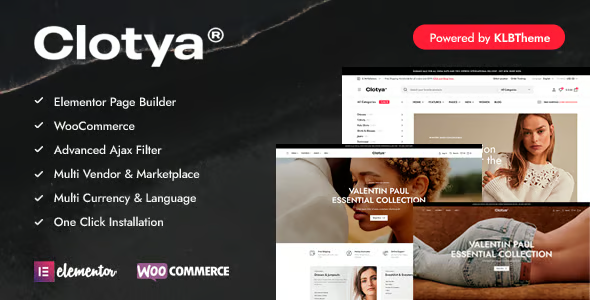
Clotya Fashion Store eCommerce Theme

$39.00 Original price was: $39.00.$4.99Current price is: $4.99.
Fashion eCommerce theme that optimizes catalog, product pages and checkout in WooCommerce, offering scalable and consistent templates for clothing, footwear and accessories stores with a focus on UX and visual performance.
Clotya Fashion Store eCommerce Theme is a specialized theme for fashion stores in WordPress and WooCommerce, aimed at improving catalog presentation, product browsing speed and conversion on mobile and desktop, provided the site already has a functional eCommerce installation.
Introduction to Clotya Fashion Store eCommerce Theme
This theme is designed for e-commerce projects based on WordPress and WooCommerce, optimizing category navigation, catalog filters, mobile experience, and paths to checkout for clothing, footwear, and accessories stores, with a clear focus on reducing visual and operational friction in every user interaction.
From a technical point of view, this tool focuses on offering a clean template structure, specific widgets for fashion, flexible layouts and compatibility with common visual builders, facilitating more orderly workflows for publishing products, managing collections, seasonal landing pages and sale campaigns without redoing the entire front-end.
Imagine a technician reviewing a clothing store with high cart abandonment rates: by implementing this module, they adjust product templates, reorganize the collection menu, simplify the header, and test a cleaner checkout; after several real orders, they validate fewer unnecessary steps and more consistent navigation with the catalog.
Product overview
This plugin primarily operates on the front-end of WordPress and WooCommerce, impacting the layout of product, archive, cart, and checkout pages, directly influencing perceived stability, visual performance, product data readability, and user experience during navigation, filtering, and the purchase process.
In a small store, before using the tool, the catalog resembles a generic blog; after implementation, fashion categories gain hierarchy, and users can more quickly identify sizes, colors, and collections. In a medium-sized store, redundant sections are eliminated, and promotional modules are aligned with seasons. In large projects, design patterns are stabilized, global templates are reused, and the visual architecture of hundreds of products is unified, reducing design inconsistencies between campaigns and maintaining recognizable purchase flows.
- Step 1: Initial situation without the plugin. The store uses a generic theme, the filters are barely visible, the product grid doesn't highlight variations, and the checkout mixes unclear elements, leading to confusing decisions for the user.
- Step 2: Key action using a specific function. An optimized catalog design is selected, side filters are activated, a specific header for fashion is applied, and the product page is customized with clear sections for sizes, a measurement guide, and related products.
- Step 3: Observable results in operation (less friction, more control, fewer errors). The content team publishes new collections faster, reduces manual edits on each listing, and users complete the flow from category to checkout with fewer unnecessary clicks and a more straightforward view of prices, shipping, and policies.
Requirements and dependencies (without versions)
This theme requires a WordPress site with WooCommerce properly configured, a working payment provider, and a minimum number of products to take advantage of its structure; before using it, it's advisable to check compatibility with the visual builder, caching plugins, and image optimization tools.
- Primary dependency (if applicable) expressed without versions. Requires an active WooCommerce to display shop templates, products, cart, and checkout, and integrates natively with standard product data types such as simple, variable, grouped, and featured.
- General compatibility (checkout, renewals, roles, taxes, shipping) depending on the tool type. It works with the standard WooCommerce checkout flow, respects tax rules, shipping methods, coupons, and user roles, provided these rules are correctly defined in the dashboard and there are no conflicts with plugins that completely replace the cart or payment process.
- Typical limitations or scenarios where it's advisable to test first (without being alarmist). In stores with many design extensions, complex mega menus, or custom checkout builders, it's advisable to set up a test environment, review overridden templates, and validate that there are no style overlaps or duplicate templates in the child theme folder.
Key benefits for your project
- Fashion-oriented visual architecture. This plugin provides layouts designed for collections, seasons, and lookbooks, making it easier for the marketing team to create cohesive campaign pages without relying heavily on a developer. It also provides a repeatable template for launching sales, new lines, and collaborations.
- Cleaner purchase flows. By offering specific templates for catalog, product, and checkout, the tool helps reduce distracting elements, reorder important blocks (price, size, buy button), and display critical stock or shipping messages in visible positions, improving the operational readability of the order.
- Improved use of product data. The extension structures attributes such as size, color, and materials in prominent areas, allowing users to compare variations more easily. This makes it easier for the content team to standardize attributes and tags, also contributing to more consistent filters and internal searches.
- Scalability for large catalogs. By working with reusable templates and global options, this tool allows stores with hundreds of products to maintain a unified design; the team only adjusts master blocks, reducing manual errors when uploading new collections or modifying cross-platform campaigns.
- Compatibility with builders and widgets. This module typically integrates with common visual builders in WordPress, allowing designers and implementers to adjust sections without touching code, while maintaining a consistent style base and avoiding overloading the site with redundant design layers.
- Better foundation for SEO and engine optimization. The theme's clear structure of titles, descriptions, and breadcrumbs helps search engines and engine optimization tools better understand hierarchies of categories, collections, and products, provided the content is well-written and technical SEO plugins are properly integrated.
Highlighted Features of Clotya Fashion Store eCommerce Theme
- Specific templates for fashion stores. Offers designs for categories, collections, product pages, and lookbooks focused on clothing, footwear, and accessories, helping to visually organize variations, reviews, and recommendations, resulting in more natural navigation within WooCommerce.
- Support for advanced catalog filters. The tool integrates with filters for size, color, price, and other attributes, displaying clear interfaces in the sidebar or top bar. This allows for a fast product search flow, especially in large catalogs, improving the detection of relevant products.
- Optimized header and menu for eCommerce. This module includes header designs with direct access to the cart, account, and search bar, reducing clicks and making it easier for users to resume unfinished purchases. In stores with heavy mobile traffic, this structure directly impacts the smoothness of the checkout process.
- Compatibility with marketing pages and landing pages. The theme includes pre-designed sections for hero banners, featured collections, and promotional grids, allowing you to launch targeted campaigns (Black Friday, summer season, outlet) without disrupting the standard store flow or affecting overall performance.
- Consistent styles for the shopping cart and checkout. The extension adjusts fonts, colors, spacing, and error messages at key ordering steps, making the process feel more streamlined. This reduces confusion often found in lengthy forms and improves the readability of final costs, coupons, and taxes.
- Basic optimization for mobile devices. Responsive design prioritizes crisp thumbnails, accessible buttons, and legible forms on small screens, avoiding unnecessary zooming. In practice, this behavior helps stabilize the experience for users who primarily browse and shop from smartphones.
Who is this product ideal for?
This plugin is especially useful for fashion e-commerce projects seeking a balance between customization and stability, where the technical team wants to control templates and performance, while the marketing team needs to launch quick campaigns without breaking the overall visual consistency of the site.
- Administrators who need order and traceability. They can establish a clear structure of categories, collections, and templates, making it easy to know which design is applied in each area and how it affects operational metrics such as cart abandonment or clicks on featured products.
- Teams with multiple projects and operational consistency. Agencies or freelancers managing several clothing stores can reuse design patterns, layout processes, and UX best practices, reducing implementation times without sacrificing brand customization.
- Implementers, designers, and marketing managers will have a flexible visual environment to test layouts, banners, recommendations sections, and trust blocks, while leveraging WooCommerce's robust foundation for payments, shipping, and taxes without reinventing the front-end with every change.
Practical use cases
- Context: Urban clothing store with a medium-sized catalog. Problem: Users can't find sizes quickly. Extension use: Visible filters for size and color are configured, and the product page is reorganized to highlight availability. Result: Fewer support inquiries about stock and faster selection of variations.
- Context: Online boutique with strong seasonal campaigns. Problem: Each collection launch requires redesigning pages from scratch. Solution: Master collection templates are created and duplicated with minimal adjustments. Result: Reduced layout effort, consistency across campaigns, and shorter publication times.
- Context: Multi-country store with different shipping rules. Problem: Users are unsure of the final costs before paying. Plugin use: Order summary blocks are refined, and shipping and tax messages are highlighted at checkout. Result: Fewer abandoned orders due to uncertainty, and better understanding of the total before payment.
- Context: Emerging brand receiving primarily mobile traffic from social media. Problem: Slow navigation and small buttons in the previous theme. Extension use: Mobile-first templates and simplified menus were implemented. Result: A more direct product-to-checkout flow with fewer unnecessary steps and more legible forms.
Frequently Asked Questions about the Clotya Fashion Store eCommerce Theme
What do I need to have set up before I start using this theme in my store?
It's recommended to have WordPress and WooCommerce already installed, a working payment method, and at least a few products created with their main attributes. This way, you can quickly validate templates, check how categories are displayed, and verify that the checkout process complies with your tax and shipping rules.
How does this issue affect the user experience at checkout?
The tool provides styles and structures that better organize fields, messages, and totals in the checkout process, reducing distractions and improving readability. The actual impact depends on your payment methods and any additional extensions, so it's advisable to test with trial orders and review each step of the flow.
Does it allow working with automations or rules based on categories and collections?
The theme doesn't replace automation plugins, but its organization of categories, tags, and collections makes it easier to apply taxonomy-based rules more consistently. For example, you can combine it with automated discount tools or dynamic recommendations and leverage its visual structure to clearly display those rules to the user.
Does it have an impact on subscription renewals or failed payments?
This plugin focuses on the visual and user experience layer, so it doesn't directly handle renewals or payment logic. However, it does influence how error messages, failed payment notifications, or retry instructions are displayed, provided you're working with subscription extensions compatible with standard WooCommerce templates.
How does the store interface handle taxes, shipping, and coupons?
The theme respects the tax, shipping method, and coupon rules defined in WooCommerce, displaying them in areas designed for quick reading. Your tax and logistics settings still take precedence; this tool simply provides a clearer layout of totals, discounts, and additional costs for the customer.
Does this issue affect the site's performance or stability?
Stability depends on the combination of server, plugins, and caching, but the tool is designed to work with the standard WordPress and WooCommerce structure. To avoid problems, it's advisable to measure loading times, review image usage, and minimize overlaps with other design plugins or resource-intensive builders.
Can I use it in multisite installations or with multiple stores at the same time?
In multisite environments, you can apply the theme to different sites across the network, managing each store with its own settings and branding. It's important to define from the outset which settings will be global and which specific to each site, and to document the base styles to maintain visual consistency without hindering the customization of each brand.
How can I check that everything is working correctly after setting it up?
Perform a basic checklist: test category navigation, filters, product pages, cart, and checkout with various payment methods and coupons. Review on mobile and desktop, ensure error messages are legible, and confirm that taxes, shipping costs, and totals match the WooCommerce settings and business expectations.

Written and reviewed by the PrimeGPL Team
At PrimeGPL, we ensure that every piece of published content is verified and reviewed by our team. We analyze features, compatibility, and performance to provide you with clear, up-to-date, and truly useful information for each product listed in our store.
Get your questions answered here
We answer your questions so you can buy in an informed and confident manner.
Does my purchase include updates?
Yes. Every product purchase includes lifetime updates, so you won't have to pay extra under any circumstances.
Is there a daily download limit?
No, not at all. After your purchase, you can download it as many times as you need, without any problem.
On how many websites can I use the products?
You can use your purchases on as many domains (websites) as you want, without any problems.
Does it include technical support?
Yes. We offer technical support Monday through Friday, during business hours UTC -3. This support includes assistance with issues related to download problems, installation problems, or errors with the purchased product.
Furthermore, support does not include configurations, customizations, tutorials, or services associated with the author.
Does my purchase have a warranty?
Yes, of course. If you have any problem that we can't solve, or if there's an external issue that doesn't have a general solution related to our service, you'll receive support and, if necessary, a full refund.
How do I access support?
After your purchase, from your user account, you can access the support section, where you can open a ticket and our team will assist you with whatever you need.
Download Previous Versions
If you have purchased this product, or have an active membership, you can download previous versions without any limits or restrictions.
| Product Name | Version | Size | Date | Download |
|---|---|---|---|---|
| Clotya Fashion Store eCommerce Theme | 1.4.9 | 6.8 MB | 03/02/2026 | Join Now |
Related Products
Below we show you different products that share the same category.