The Retailer WooCommerce Theme

$59.00 Original price was: $59.00.$4.99Current price is: $4.99.
WooCommerce theme with context-aware templates, optimized checkout, and panel customization: designed for stores that need to convert more without relying on additional code for every setting.
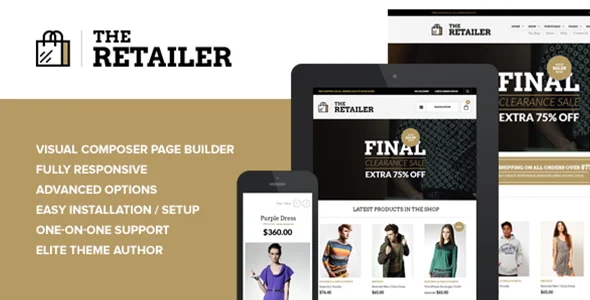
The Retailer WooCommerce Theme is a design and visual structure solution for stores that need to present catalogs clearly, convert visits into frictionless sales, and offer a consistent shopping experience from homepage to checkout. Ideal for businesses with a diverse product range that operate on WordPress and WooCommerce.
Introduction to The Retailer WooCommerce Theme
When a WooCommerce store loses sales due to confusing navigation, poorly structured product pages, or a checkout process that leads to abandonment, the problem is rarely in the catalog itself: it's in the visual layer and how the theme organizes the information the customer needs to make a decision. The Retailer WooCommerce Theme solves that friction at its root.
This plugin acts as the complete visual architecture of the site: it defines content hierarchies, organizes categories, optimizes product pages, and aligns every screen with the native WooCommerce flows. It's not just a decorative layer. It's the structure that determines whether a customer confidently reaches the purchase button or gets lost before even trying.
An administrator who inherits a store with a high bounce rate on product pages can immediately identify, upon evaluating the tool, that the previous layout didn't prioritize price, images, or calls to action. By applying this module, they visually reorganize those elements without affecting the catalog or prices, and the back office reflects the same order the customer experiences on the front end.
Product overview
The functional area of a well-built WooCommerce theme encompasses everything from how products are displayed in the listing to how the customer manages their cart, applies coupons, or reviews their order before paying; when that layer fails, no amount of campaign or catalog optimization can compensate for the lost conversions.
Before incorporating this extension, many stores use generic themes that don't respect WooCommerce's workflows: misaligned widgets, checkout pages without visual hierarchy, and product pages that hide stock levels or shipping times. The administrator has to patch things up with additional plugins, instead of addressing the issues the theme should handle by design.
- Without the add-on: The operator accumulates visual customization plugins to compensate for a theme that was not designed with WooCommerce as its central axis, generating inconsistencies on mobile, slow loading times, and disparate experiences depending on the device.
- With the active add-on: The tool applies a system of specific templates for shop, category, individual product, cart and checkout, each optimized to guide the customer without distractions towards conversion.
- Observable result: The purchase flow gains visual consistency across all touchpoints, the back office requires less manual intervention to maintain the correct appearance, and the customer experiences predictable navigation that reduces the abandonment rate.
Requirements and compatibility
For this module to operate correctly, you must verify that the WordPress environment has WooCommerce active as a primary dependency, that the payment gateway plugins used are compatible with the checkout templates included in the tool, and that any page builder in use does not conflict with the theme's native template system.
- Primary dependency: WooCommerce must be present and active; without it, store-specific templates have no functional context.
- Compatibility areas to review: standard and block checkout, shipping calculation by zone, coupon rules, taxes by region, and common payment gateways.
- It is advisable to validate in a staging environment when the store already has CSS customizations, visual builder plugins, or modified checkout fragments, to detect conflicts before affecting production operations.
Key benefits for your operation
- Reduction of product abandonment: Many retailers notice that customers reach the product page but don't add items to their cart. This extension organizes price, images, description, and call to action into a visual hierarchy that reduces decision friction, making it easier for customers to find what they need.
- Checkout without visual noise: A checkout process with too many elements competing for attention increases abandonment rates. The tool uses a clean checkout layout, focused on essential fields, which inspires confidence and keeps the customer on track without unnecessary distractions.
- Visual management from the back office without code: Administrators who rely on developers for every visual adjustment accumulate technical debt and slow down operations. This plugin offers customization controls that the team itself can manage, reducing external dependencies and wait times.
- Consistency on mobile without extra effort: Stores that don't prioritize responsive design lose a significant portion of their mobile sales. This module's structure adapts each template to the small screen context without requiring additional configuration, maintaining the visual hierarchy intact.
- Catalog scalability without visual chaos: When a store grows from fifty to several hundred products, category navigation can become chaotic if the theme wasn't designed to scale. This tool structures listings with filters, sorting, and grids that remain clear even as the catalog grows.
- Seamless integration with WooCommerce extensions: Operators using review plugins, product comparison tools, wish lists, or advanced features need a theme that doesn't break those elements. This plugin was built with those workflows in mind, minimizing visual conflicts with common extensions in the ecosystem.
Key features of The Retailer WooCommerce Theme
- WooCommerce context-based template system: Each section of the store—shop, category, product, cart, checkout, user account—has its own optimized template. This means the design isn't generic: it responds to what the customer is doing at any given moment, reducing the visual dissonance that breeds distrust.
- Customization options integrated into the panel: Instead of relying on additional CSS to adjust colors, fonts, or spacing, the tool exposes these variables in an accessible panel. The user can iterate over the design without technical intervention, accelerating improvement cycles.
- Native support for variants and complex products: Stores with products that have multiple attributes—size, color, material, quantity—need a clear and accessible variant selector. This module presents these options in a way that allows the customer to understand what they are choosing before adding the item to their cart.
- Conversion-oriented homepage layouts: A store's homepage should communicate its value proposition, main categories, and featured products without being overwhelming. This tool offers homepage structures that prioritize these elements, allowing the operator to organize content according to the sales strategy for each season.
- Mega menu and deep category navigation: Catalogs with many subcategories lose accessibility if the navigation isn't well-designed. This plugin includes menu structures that allow you to display complex hierarchies in an organized way, helping customers find your product without having to browse page by page.
- Optimization for loading speed: A theme with too many unnecessary script dependencies and styles slows down the store. The tool loads resources contextually, which contributes to faster response times on product and checkout pages, where speed directly impacts conversion.
Who is this product for?
This module is designed for operators who already have a functioning WooCommerce store but feel limited by the current design: stagnant conversion rates, customers arriving but not buying, or a back office where every visual adjustment requires external help. It's also suitable for those building a new store who want to avoid these problems from the start.
- Administrators or technicians who need to control the appearance of each section of the store without relying on developers for every change, while maintaining traceability of what was modified and when.
- Teams that manage multiple WooCommerce stores and are looking for a consistent visual foundation that they can adapt per brand without relearning the structure in each project.
- Marketing or UX managers who need the theme to respect their optimization workflows: A/B tests on product pages, layout changes in checkout, or reorganization of categories according to season.
Real-world use cases
- Fashion store with a high abandonment rate on product pages: A clothing store has noticed that visitors who reach the product page (70%) aren't adding anything to their cart. The problem: the images are visually competing with the size selector, and the price is relegated to the background. By applying this plugin, the product template reorganizes these elements with a clear hierarchy, the variant selector becomes accessible from the first scroll, and the purchase button gains prominence. The result is a cleaner decision flow that the operator can replicate each new season without touching the code.
- Niche marketplace that scales its catalog: A professional tool store went from one hundred to eight hundred product lines in six months. Category navigation became visually overwhelming, and customers couldn't find specific products. This module implements a mega-menu and filtered listing system that scales without degrading the user experience, allowing the team to add new categories without redesigning the navigation each time.
- Agency that manages multiple WooCommerce clients: A technical team maintains five stores for different clients, each with its own brand identity but the same functional needs. The tool acts as a common structural foundation: the team customizes colors and fonts for each client directly from the dashboard, without having to redesign the architecture for each project. This operational consistency reduces the onboarding time for each new store.
- Grocery store with problematic checkout on mobile: A gourmet food store noticed that its mobile sales were disproportionately low compared to its overall traffic. The current checkout on small screens had confusingly stacked fields, and the payment button required excessive scrolling. By activating this plugin, the checkout layout adapted to the mobile context with a hierarchy that guided the customer step by step. The operator observed an improvement in the mobile order completion rate without any additional configuration.
Frequently Asked Questions about The Retailer WooCommerce Theme
Does it work correctly with the plugins I already have installed in my store?
Compatibility depends on the type of plugins you use and whether they interfere with WooCommerce templates. This tool was built respecting the ecosystem's native hooks and filters, so payment gateway, shipping management, coupon, and tax plugins usually integrate without conflicts. However, if you use a page builder with custom templates for the checkout or product page, it's advisable to test it in a staging environment before deploying it to production. Review, wishlist, and product comparison plugins are generally compatible because the theme respects standard WooCommerce anchor points.
What real impact does it have on the customer experience during the buying process?
The most immediate impact occurs at the points where the customer makes decisions: the product page, the shopping cart, and the checkout. This module organizes these moments with a visual hierarchy that reduces cognitive friction: the price is where the customer expects it, the buy button is prominent, and the checkout doesn't compete with distracting elements. A customer who navigates clearly completes the order with fewer doubts and less abandonment during the process.
Does it allow you to configure visual rules or conditions based on product type or category?
This extension offers context-specific WooCommerce templates, meaning you can apply different layouts to different sections of your store. While advanced conditional logic—such as displaying an element only to certain roles or in certain categories—is typically handled by companion plugins, the core template system allows you to independently control what's displayed in the shop, category, product, and user account sections, without changes in one section affecting the others.
Does it affect in any way the management of renewals or recurring payments in the store?
This plugin works on the visual and structural layer of the store, not on the payment logic or subscription flows. If you use recurring payment plugins, those flows retain their logic; what's improved is how the customer sees and navigates the pages related to their account, order history, and payment method management. The design of these sections gains consistency without altering the functional behavior of the renewal plugins.
How do you handle coupons, taxes, and shipping costs at checkout?
The theme respects WooCommerce's logic for displaying discounts, itemized taxes, and shipping options in the cart summary and at checkout. The design prioritizes making this information visible and understandable to the customer before they confirm their order, reducing post-purchase complaints about unexpected prices. If you use zone-based shipping or regional tax plugins, this data is presented in the same visual order as the rest of the flow, requiring no additional theme configuration.
Can it handle large catalogs without impacting the overall performance of the store?
This module is designed so that visual resources—styles, scripts—are loaded contextually based on the active template, preventing unnecessary code from appearing on pages where it doesn't apply. This helps maintain reasonable loading times even as the catalog grows. That said, the overall performance of a store depends on multiple factors—hosting, caching, optimized images—and no single theme guarantees perfect results. What it does prevent is adding unnecessary overhead.
Is it viable to use it in a multisite environment or to manage several stores at once?
In a WordPress multisite environment, the theme can serve as the visual foundation for multiple store installations, allowing each to customize colors, fonts, and some layouts from its own dashboard without affecting the others. This is a significant advantage for agencies or brand groups that want structural consistency with distinct visual identities. Centralized management reduces maintenance time, although each store must validate its own plugins and extensions independently.
How do I know it's working correctly once it's been applied?
A practical validation checklist includes: verifying that the shop template displays products in the expected grid, that the product page respects the hierarchy of image, price, variants, and purchase button, that the checkout presents the fields in the correct order without broken visual elements, that the cart summary displays coupons and taxes legibly, and that on mobile each section is navigable without horizontal scrolling. If all these points are correct in your environment, the plugin is operational and aligned with WooCommerce workflows.

Written and reviewed by the PrimeGPL Team
At PrimeGPL, we ensure that every piece of published content is verified and reviewed by our team. We analyze features, compatibility, and performance to provide you with clear, up-to-date, and truly useful information for each product listed in our store.
Get your questions answered here
We answer your questions so you can buy in an informed and confident manner.
Does my purchase include updates?
Yes. Every product purchase includes lifetime updates, so you won't have to pay extra under any circumstances.
Is there a daily download limit?
No, not at all. After your purchase, you can download it as many times as you need, without any problem.
On how many websites can I use the products?
You can use your purchases on as many domains (websites) as you want, without any problems.
Does it include technical support?
Yes. We offer technical support Monday through Friday, during business hours UTC -3. This support includes assistance with issues related to download problems, installation problems, or errors with the purchased product.
Furthermore, support does not include configurations, customizations, tutorials, or services associated with the author.
Does my purchase have a warranty?
Yes, of course. If you have any problem that we can't solve, or if there's an external issue that doesn't have a general solution related to our service, you'll receive support and, if necessary, a full refund.
How do I access support?
After your purchase, from your user account, you can access the support section, where you can open a ticket and our team will assist you with whatever you need.
Download Previous Versions
If you have purchased this product, or have an active membership, you can download previous versions without any limits or restrictions.
| Product Name | Version | Size | Date | Download |
|---|---|---|---|---|
| The Retailer | 7.2 | 7.8 MB | 26/03/2026 | Join Now |
Related Products
Below we show you different products that share the same category.