
Rhye AJAX Portfolio WordPress Theme
$59.00 Original price was: $59.00.$4.99Current price is: $4.99.
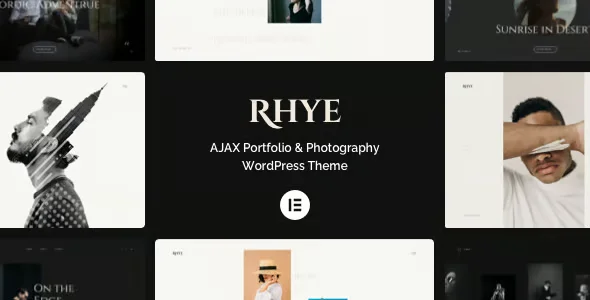
Rhye AJAX Portfolio WordPress Theme is a high-performance visual solution for creatives and agencies that need to showcase projects without page reloads. Designed for demanding portfolios, it eliminates the perceived slowness that drives visitors away and operates on WordPress with AJAX transitions that maintain a smooth, cohesive, and professional experience from the very first click.
Introduction to Rhye AJAX Portfolio WordPress Theme
Rhye AJAX Portfolio WordPress Theme transforms the way a creative site presents its work, eliminating full page reloads that interrupt the visitor's narrative flow and generate abandonment rates that no operator can afford to ignore in a competitive environment.
The tool integrates directly into the WordPress ecosystem as a core theme, not as an overlay. This means that all the visual architecture, custom content types, and AJAX navigation logic coexist within a single, clean core, reducing plugin conflicts and simplifying long-term site maintenance.
Imagine a freelance designer receiving a potential client in their portfolio: without this plugin, every click between projects triggers a loading screen that disrupts the flow. With the tool active, the client navigates through projects as if exploring a native application, immediately perceives professionalism, and the designer closes more deals from the first contact.
Product overview
The visual management of a professional portfolio requires aesthetic consistency, navigation speed, and total control over how projects are presented—three factors that determine whether a visitor stays long enough to become a client or leaves before seeing the best of the work.
Without this module, a typical WordPress portfolio loads each project as a new page, losing the accumulated visual context and forcing the visitor to wait with each transition. The experience becomes fragmented, the brand is perceived as slow, and the operator lacks visual tools to guide attention where it matters most.
- Without the add-on: Each navigation between projects generates a complete reload that interrupts the visitor's immersion, increases the perceived loading time, and dilutes the portfolio's visual identity.
- With the active add-on: AJAX transitions load the next content in the background while the visitor is still viewing the current one, creating a seamless, cinematic flow between jobs.
- Observable result: lower bounce rate, longer session time, and a stronger brand perception that translates into more qualified business conversations.
Requirements and compatibility
Before deploying this extension to production, it is advisable to check that the WordPress environment is free of conflicting child themes, that caching plugins are configured not to interfere with AJAX routes, and that the server responds with adequate timings to take advantage of real-time transitions.
- It functions as a main WordPress theme; it doesn't require an additional parent theme, which simplifies the template hierarchy and reduces points of failure.
- Compatible with standard content management workflows: custom post types for projects, portfolio categories, galleries, embedded video, and selected Gutenberg blocks.
- It's advisable to test in a staging environment when the site uses aggressive JavaScript optimization plugins, as some minifiers can alter the behavior of AJAX transitions if they are not properly excluded.
Key benefits for your operation
- Frictionless navigation that retains visitors: Losing a visitor between projects because the page took two seconds to load is a silent cost that adds up. This tool transparently preloads the next content, keeping the visitor engaged in the visual narrative without interruptions that break their attention.
- Consistent visual identity in every transition: When the header disappears and reappears on each refresh, the brand perception becomes fragmented. The plugin maintains consistent elements across views, reinforcing aesthetic coherence and conveying professionalism without requiring manual intervention from the operator each time.
- Editorial control over project submissions: Organizing a portfolio by categories, tags, or custom sequences requires a flexible structure. This extension offers filtering and sorting options that the administrator controls from the back office, without touching code and without relying on a developer for each adjustment.
- Optimized loading of visual resources: Portfolios are inherently large: high-resolution images, videos, galleries. This module manages the lazy loading of media so that visitors don't have to wait for the entire project to be ready before interacting, improving the user experience, especially on mobile devices.
- Scalability without performance degradation: Adding twenty new projects shouldn't slow down navigation. The tool's AJAX architecture downloads only the necessary content at any given time, preventing portfolio growth from becoming a speed issue that the operator discovers too late.
- Operator autonomy for seamless technical updates: Relying on a developer for every visual change has a real cost in time and money. The customization options built into the admin panel allow you to adjust fonts, palettes, layouts, and behaviors without editing files, keeping operations streamlined.
Key features of the Rhye AJAX Portfolio WordPress Theme
- AJAX transitions between projects: The key differentiator of this plugin is its zero-reload navigation system. When a visitor clicks on a project, the content loads in the background while the exit animation plays, eliminating any perceptible wait time and maintaining the narrative flow that makes a portfolio a memorable experience.
- Multiple portfolio layouts: The tool offers various grid layouts—masked, full-screen, with visible metadata, or minimalist—that the administrator can assign by category. This allows for different ways to present photography for branding projects without needing separate templates or additional plugins.
- Custom cursor and microinteractions: Details such as a context-sensitive cursor or hover effects that reveal project information add a layer of sophistication that visitors perceive even if they don't consciously identify it. This extension includes them by default, requiring no configuration from the operator beyond activation.
- Typography and palette configurable from the panel: Changing the font of portfolio titles or adjusting the accent color for a special presentation are tasks that this module solves from the WordPress customizer, with real-time preview, avoiding production errors due to blind changes.
- Integration with video players and Vimeo/YouTube: Many creative projects include showreels or video demos. The tool manages the insertion of embedded players within the AJAX flow without the transition interrupting playback or generating JavaScript errors that the administrator would have to debug manually.
- Full screen mode for individual projects: Some projects deserve all the attention available. This extension lets you activate an immersive view that temporarily removes the header and footer, focusing the visitor on the content and increasing the perceived impact of the most important pieces in the portfolio.
Who is this product for?
This module addresses the needs of those who build their professional reputation through what they showcase online: designers, photographers, creative directors, and agencies who know that the speed and visual consistency of their portfolio are as important as the work it contains.
- Administrators of creative sites who need to update the portfolio frequently without relying on external technical interventions, maintaining complete editorial control from the back office.
- Agencies with multiple clients or active projects that require a scalable structure, capable of growing in volume without losing performance or visual consistency between sections.
- Brand or marketing managers who need each visitor interaction with the portfolio to reinforce the perception of quality, professionalism, and attention to detail that the business wants to convey.
Real-world use cases
- Design agency with a growing portfolio: An agency has accumulated years of projects across diverse categories—identity, web, packaging—and navigation between them has become slow and disorganized. With this tool, they activate category filters with AJAX transitions, allowing visitors to explore seamlessly and significantly increasing session time, along with more incoming quote requests.
- Commercial photographer who presents to high-level clients: Each page refresh during a live presentation breaks the flow and creates discomfort. The plugin eliminates these pauses, allowing the photographer to navigate between series seamlessly during meetings, conveying a flawless technical image that reinforces client confidence before signing.
- Freelancer launching a new portfolio from scratch: Starting with a solid technical foundation saves hours of future work. This module provides the structure, layouts, and customization options needed for freelancers to focus their energy on curating their work, not on troubleshooting performance or compatibility issues that would arise with less integrated solutions.
- Creative studio that manages portfolios for several creatives: With WordPress Multisite or multiple independent sites, maintaining consistency across different portfolios is costly. This tool allows you to replicate the base configuration across sites, reducing maintenance time per instance and ensuring that each portfolio functions with the same level of technical quality without duplicate configurations.
Frequently Asked Questions about the Rhye AJAX Portfolio WordPress Theme
Does it work well with common caching plugins?
Compatibility with caching plugins depends on their configuration: if the plugin aggressively minifies or combines JavaScript files, it can interfere with AJAX routing. The usual solution is to exclude the theme's scripts from this optimization. In most well-configured environments, coexistence is stable, but it's always advisable to test in a staging environment before deploying changes to production.
How does the visitor experience on mobile devices affect the experience?
This plugin's design is inherently responsive, adapting layouts to small screens without sacrificing visual appeal. AJAX transitions also work on mobile, although the effect may be less smooth on very slow connections. Lazy loading of images helps compensate for limited bandwidth, offering a perceptibly faster experience than a conventional reload under the same conditions.
Does it allow you to configure automatic filtering rules by project type?
The module includes a filtering system based on WordPress taxonomies—categories and custom tags—which the administrator assigns from the back office. It requires no complex rules or additional code: projects are tagged, and the front end automatically displays the filters. The display logic is updated with AJAX, without reloading the page when changing categories.
Is this topic relevant for stores with recurring payments or subscriptions?
The Rhye AJAX Portfolio WordPress Theme is designed for creative portfolios, not e-commerce stores with subscription or recurring payment logic. If your site combines a portfolio and a store, it can coexist with WooCommerce plugins, but managing renewals or failed payments is handled by those plugins, not this theme.
How does it interact with pricing structures or service catalogs?
This module does not natively manage prices or catalogs. However, it is possible to create service or pricing pages within the same site using static WordPress pages or dedicated plugins. The tool focuses on the visual presentation of the creative work, leaving the business logic to tools specifically designed for that function.
Does performance degrade when the portfolio has many projects?
The AJAX architecture loads only the requested project per interaction, not all at once, which limits the impact of volume on the visitor experience. That said, server speed and image optimization remain critical factors. A portfolio with uncompressed images will still be slow regardless of the theme; the tool improves navigation, but it doesn't replace good media management.
Can it be used in a WordPress Multisite environment to manage multiple portfolios?
The theme can be activated in multisite environments, although license and option management is done per site. There is no centralized dashboard to control all portfolios from a single interface, so configuration updates must be applied individually to each instance. For agencies with many sites, this represents an operational burden to consider before scaling.
How do I know if the theme is working correctly after setting it up?
Basic validation includes: checking that navigating between projects doesn't cause full page reloads (observable in the browser's address bar), verifying that category filters are applied without a visible refresh, checking that images load lazily in projects with large galleries, and confirming that there are no JavaScript errors in the browser console. If these four checks are successful, the tool is working as expected.
Short description
WordPress theme for creative portfolios with seamless AJAX navigation, customizable layouts, and lazy media loading. Ideal for designers and agencies that need to showcase their work without overwhelming the visitor experience.

Written and reviewed by the PrimeGPL Team
At PrimeGPL, we ensure that every piece of published content is verified and reviewed by our team. We analyze features, compatibility, and performance to provide you with clear, up-to-date, and truly useful information for each product listed in our store.
Get your questions answered here
We answer your questions so you can buy in an informed and confident manner.
Does my purchase include updates?
Yes. Every product purchase includes lifetime updates, so you won't have to pay extra under any circumstances.
Is there a daily download limit?
No, not at all. After your purchase, you can download it as many times as you need, without any problem.
On how many websites can I use the products?
You can use your purchases on as many domains (websites) as you want, without any problems.
Does it include technical support?
Yes. We offer technical support Monday through Friday, during business hours UTC -3. This support includes assistance with issues related to download problems, installation problems, or errors with the purchased product.
Furthermore, support does not include configurations, customizations, tutorials, or services associated with the author.
Does my purchase have a warranty?
Yes, of course. If you have any problem that we can't solve, or if there's an external issue that doesn't have a general solution related to our service, you'll receive support and, if necessary, a full refund.
How do I access support?
After your purchase, from your user account, you can access the support section, where you can open a ticket and our team will assist you with whatever you need.
Download Previous Versions
If you have purchased this product, or have an active membership, you can download previous versions without any limits or restrictions.
| Product Name | Version | Size | Date | Download |
|---|---|---|---|---|
| No hay versiones anteriores registradas. | ||||
Related Products
Below we show you different products that share the same category.



