
Motta Multi-Vendor and Marketplace Theme
$59.00 Original price was: $59.00.$4.99Current price is: $4.99.
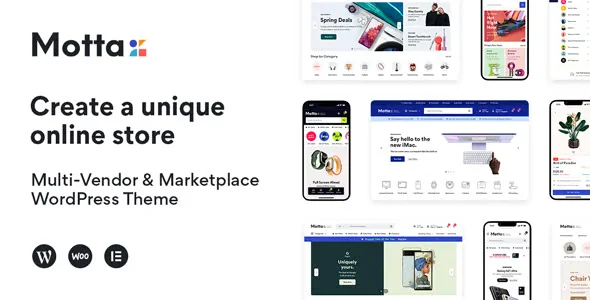
Motta Multi-Vendor and Marketplace Theme is a WordPress theme designed for multi-vendor marketplace operations. It transforms a standard WooCommerce store into a platform where multiple vendors manage their own catalogs, commissions, and orders. Ideal for operators who need to scale without increasing their administrative burden, its integration with multi-vendor plugins consolidates disparate workflows into a single, cohesive, and functional visual environment.
Introduction to Motta Multi-Vendor and Marketplace Theme
Managing a marketplace with WooCommerce without a theme designed for it means patching styles, forcing generic layouts, and losing visual control over seller dashboards, shop pages, and checkouts that should work together from the start; Motta Multi-Vendor and Marketplace Theme was built to eliminate exactly that structural friction.
The tool is more than just a visual layer. Its architecture responds to the data patterns generated by the most widespread multi-vendor plugins: commission tables, dashboards per vendor, product listings per store, and approval workflows. Every component of the theme understands this context and presents it without requiring extensive manual customization.
An administrator setting up a store with multiple active sellers for the first time can assign individual store layouts, activate seller rating modules, and review the checkout appearance from the back office, all within an environment where styles are already aligned with the underlying multi-seller logic.
Product overview
The functional area where this add-on makes the most visible difference is the buyer and seller experience simultaneously: consistency between the seller's dashboard, the public store page, and the purchase process determines whether a marketplace builds trust or destroys it, and that directly affects conversion rates and retention.
Without this module, operators often combine a generic theme with a multi-vendor plugin, resulting in vendor pages with broken styles, checkouts that don't recognize the on-screen commission logic, and vendor dashboards that look disconnected from the rest of the site. With the plugin active, all these touchpoints share a unified design system, reducing setup time and visual support tickets.
- Without the add-on: The operator spends hours fixing CSS, vendors complain that their panel doesn't match the rest of the site, and buyers perceive a fragmented experience that leads to abandonment.
- With the active add-on: Shop pages by seller, product listings, and multi-seller checkout are rendered with pre-designed and consistent layouts, without manual code intervention.
- Observable result: Less visual friction throughout the buying flow, recognizable vendor dashboards, and an operation that scales without accumulating design debt.
Requirements and compatibility
Before deploying this extension to production, it's advisable to check which multi-vendor plugins are active in the environment, as the theme is designed to integrate with specific solutions from that ecosystem and its visual behavior depends directly on those dependencies being present and correctly configured.
- Requires WordPress with an active WooCommerce as the operating base; without the store engine, the marketplace components have no data to render on.
- Compatible with WooCommerce standard and extended checkout flows, including seller role management, on-screen commission calculation, seller shipping modules, and common payment gateways.
- Before activating it in a store with real traffic, it is advisable to validate the behavior of the layouts in a staging environment, especially if there are checkout customizations or third-party integrations that modify the product loop.
Key benefits for your operation
- Eliminating multi-vendor design debt: Operating a marketplace with a generic theme leads to visual inconsistencies that become costly to correct. This tool delivers a design system built for multi-vendor logic from the ground up, reducing the time the technical team spends on visual patches and freeing up resources for higher-impact tasks.
- Integrated and recognizable vendor dashboards: One of the biggest points of friction for marketplace sellers is a management panel that doesn't feel like part of the site. This module visually unifies the seller's private area with the public frontend, reducing the learning curve and minimizing operational inquiries to the administrator.
- Checkout consistent with the commission logic: When the checkout process doesn't accurately reflect the seller structure, buyers develop doubts that lead to abandoned carts. This tool integrates the seller's presentation into the purchase flow, providing transparency without requiring additional development.
- Scalability without redesign: As new sellers are added, the store needs additional shop pages to maintain consistency. This plugin manages that scale through reusable templates that don't require manual intervention for each new seller.
- Better UX for the end buyer: Visual fragmentation is one of the silent drivers of abandonment in marketplaces. By unifying the experience from the listing to post-checkout, the tool helps the buyer complete the cycle without encountering visual signs of distrust.
- Reduction of errors in back office: An administrator working with multiple active vendors needs data presented clearly. This extension organizes store, product, and order information in a way that naturally reduces management errors caused by visual confusion.
Highlighted Features of Motta Multi-Vendor and Marketplace Theme
- Shop pages per seller with dedicated layout: Each seller on the marketplace has a shop page with its own visual structure, separate from the general catalog. This allows shoppers to explore a specific seller's offerings with a consistent experience, increasing dwell time and facilitating cross-buying within the same seller.
- Visual integration with leading multi-vendor plugins: The theme is built using the data structure generated by the most popular multi-vendor plugins in the WooCommerce ecosystem. This integration eliminates the need for the administrator to create visual bridges between the theme and the plugin, reducing setup time and the potential for conflicts.
- Seller rating and reputation system: Seller reputation is a key conversion factor in any marketplace. This extension displays ratings seamlessly on the shop page and product listings, without requiring additional plugins or template customization.
- Marketplace-adapted header and navigation: Marketplace navigation has different needs than a single-vendor store. The plugin includes header components that allow shoppers to directly access seller stores, cross-categories, and their purchase history, reducing orientation friction.
- Product comparison module: In marketplaces with a high density of similar products from different sellers, the ability to compare is a key differentiator. This tool incorporates that module natively, allowing the buyer to make informed decisions without leaving the browsing flow.
- Dark mode and display preferences: Visual adaptability isn't just about aesthetics; it responds to the real preferences of users who spend extended periods of time on the platform. The theme natively supports dark mode, which improves the perceived quality of the marketplace and reduces eye strain during long sessions.
Who is this product for?
This module is designed for those who already operate or are building a marketplace with multiple sellers and have reached the point where a generic theme creates more problems than it solves. It's not for those setting up a simple store; it's for those managing multi-seller complexity and needing a design that supports that logic.
- Administrators or technicians who need visual traceability of the multi-vendor operation without relying on custom development for each new vendor.
- Teams that manage multiple marketplace projects and need a consistent design foundation that doesn't require complete reconfiguration for each deployment.
- UX, marketing or conversion managers who detect abandonment related to visual fragmentation of the checkout or store pages by seller.
Real-world use cases
- Multi-brand fashion marketplace: A marketplace that brings together dozens of independent brands needs each seller to have their own identity without disrupting overall consistency. The administrator activates store templates for each seller, configures rating modules, and achieves a result where each brand has its own recognizable space without the buyer losing track of the marketplace. The result is a lower abandonment rate on seller pages and longer session times per user.
- Digital product marketplace: A platform selling courses, templates, or digital resources from various creators faces the challenge of presenting very different products under the same visual style. This tool allows each creator to manage their own shop page with their own banners and descriptions, while maintaining consistency in the multi-vendor checkout process. The buyer completes the purchase without encountering any red flags.
- Directory of local services with integrated payment: A marketplace connecting local service providers with buyers needs each provider's page to function as a mini-store with ratings, descriptions, and their own catalog. This plugin delivers that structure without additional development, and the administrator can add new providers using existing templates. What previously required technical work for each addition is now a replicable process.
- B2B marketplace with multiple wholesale sellers: In a B2B environment where buyers compare price and reputation before making a decision, the lack of a clear seller presentation leads to abandonment in later stages of the sales funnel. By activating this extension, the operator gains access to seller pages with reputation information, a filtered catalog, and direct access to the checkout, reducing decision time and increasing the conversion rate for high-value orders.
Frequently Asked Questions about the Motta Multi-Vendor and Marketplace Theme
Does it work with any multi-vendor plugin for WooCommerce?
The theme is designed with specific integration for the most widespread multi-vendor plugins in the WooCommerce ecosystem, not for all plugins generically. Before deploying, it's advisable to verify that the multi-vendor plugin you're using is among those listed as compatible by the theme developer. If you're working with a less common solution, some visual components may not render data correctly without additional adjustments. Functional compatibility depends on both layers sharing the same vendor data structure.
How does the buyer experience at checkout change when there are multiple sellers in the cart?
The checkout process in a multi-vendor marketplace is one of the points with the highest risk of abandonment because the buyer may encounter mixed shipping methods, fees, or sellers without visual clarity. This module presents that information in a structured way, indicating which products belong to each seller and how costs are distributed, reducing uncertainty and increasing the likelihood that the buyer will complete the purchase without contacting support.
Does the theme activate automatic commission rules, or does that depend on the multi-vendor plugin?
The commission logic resides in the multi-vendor plugin, not the theme. This extension presents that logic visually and consistently within the checkout and the seller dashboard, so both the buyer and seller understand the distribution without needing further explanation. It doesn't modify business rules; it simply makes them visible and understandable.
Does it properly handle failed payments or subscription renewals by vendor?
The handling of failed payments and renewals depends on the subscription plugin and payment gateway, not the theme. The plugin can visually display the status of a subscription or pending payment within the buyer's account area, but the retry or failure notification process is controlled by the underlying payment layer. It's important to validate this process specifically in staging if your marketplace includes subscription products.
How do you handle taxes and shipping when there are products from different sellers in the same order?
Tax and shipping calculations for each seller are handled by WooCommerce and the configured multi-vendor plugin. The theme presents these calculations clearly at checkout and in the order summary, differentiating by seller when the underlying logic allows. If you have complex tax rules or different shipping zones for each seller, it's advisable to test the entire flow before launching to live traffic to ensure the visual presentation accurately reflects the actual calculations.
How does the theme perform with large catalogs or many sellers active simultaneously?
Performance in high-volume operations depends on multiple factors: hosting, cache configuration, database optimization, and the load generated by the multi-vendor plugin itself. The theme is built with performance in mind, but it's not the only determining factor. With extensive catalogs, it's advisable to enable page caching, optimize images, and review the impact of the additional requests generated by the rating and comparison modules, which are the most query-intensive.
Is it possible to use this theme in a multisite network or to manage multiple marketplaces from a single WordPress site?
The theme can operate in WordPress multisite environments, but multi-vendor marketplace logic in multisite adds a layer of complexity that depends on how the multi-vendor plugin is configured in that network. Not all multi-vendor plugins fully support multisite, so actual compatibility should be validated on a case-by-case basis. For managing multiple independent marketplaces, separate instances are usually the most stable architecture rather than a shared multisite network.
How do I know if the theme is working correctly in my marketplace?
A practical checklist includes: verifying that the seller's shop pages load with the correct layout and display the seller's products without mixing catalogs, checking that the checkout process displays the seller's information clearly, verifying that the seller's dashboard has the same visual system as the public frontend, confirming that ratings appear on product pages and shop pages, and ensuring that dark mode, if enabled, doesn't break any interface components. If all these points are in order, the integration works as expected.
Short description
WordPress theme designed specifically for multi-vendor marketplaces with WooCommerce: unifies the visual experience of sellers, buyers, and checkout into a single, coherent system that scales without design debt.

Written and reviewed by the PrimeGPL Team
At PrimeGPL, we ensure that every piece of published content is verified and reviewed by our team. We analyze features, compatibility, and performance to provide you with clear, up-to-date, and truly useful information for each product listed in our store.
Get your questions answered here
We answer your questions so you can buy in an informed and confident manner.
Does my purchase include updates?
Yes. Every product purchase includes lifetime updates, so you won't have to pay extra under any circumstances.
Is there a daily download limit?
No, not at all. After your purchase, you can download it as many times as you need, without any problem.
On how many websites can I use the products?
You can use your purchases on as many domains (websites) as you want, without any problems.
Does it include technical support?
Yes. We offer technical support Monday through Friday, during business hours UTC -3. This support includes assistance with issues related to download problems, installation problems, or errors with the purchased product.
Furthermore, support does not include configurations, customizations, tutorials, or services associated with the author.
Does my purchase have a warranty?
Yes, of course. If you have any problem that we can't solve, or if there's an external issue that doesn't have a general solution related to our service, you'll receive support and, if necessary, a full refund.
How do I access support?
After your purchase, from your user account, you can access the support section, where you can open a ticket and our team will assist you with whatever you need.
Download Previous Versions
If you have purchased this product, or have an active membership, you can download previous versions without any limits or restrictions.
| Product Name | Version | Size | Date | Download |
|---|---|---|---|---|
| No hay versiones anteriores registradas. | ||||
Related Products
Below we show you different products that share the same category.




