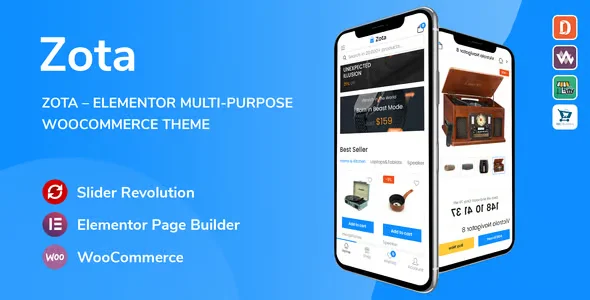
Zota MultiPurpose WooCommerce Theme

$39.00 Original price was: $39.00.$4.99Current price is: $4.99.
Multipurpose theme for WooCommerce with pre-built templates, responsive design for each device and visual control from the back office, designed for stores that need consistency in the storefront and checkout without depending on constant development.
Zota MultiPurpose WooCommerce Theme is a visual and functional solution for WordPress stores that need structure, speed, and consistency without sacrificing flexibility. Designed for operators managing complex catalogs, multiple categories, or demanding checkout flows, this theme connects directly to WooCommerce to deliver a robust, responsive, and scalable storefront experience without rewriting the design from scratch.
Introduction to Zota MultiPurpose WooCommerce Theme
Zota MultiPurpose WooCommerce Theme solves one of the most frequent problems in growing WordPress stores: the friction between visual design and WooCommerce logic, eliminating the need for constant adjustments every time the catalog, categories, or purchase flows change.
Its multipurpose nature isn't just about aesthetics. This plugin integrates pre-built page structures that respect WooCommerce's native hooks, meaning customizations don't break the data flow between the cart, checkout, and order processing. This reduces invisible errors that cost sales.
Imagine a store manager who has just added new product categories and needs the storefront to reflect that structure without touching any code. With this tool, they apply a category page template from the back office, adjust the visual hierarchy, and publish. The result arrives on the front end in minutes, with the checkout process intact.
Product overview
When a WooCommerce store scales, design management becomes a real bottleneck: inconsistent product pages, layouts that don't respond well on mobile, and a checkout that doesn't visually inspire confidence are problems that affect the conversion rate before the customer even gets to the point of paying.
This extension fundamentally changes that scenario. Before its implementation, every visual adjustment required editing template files or relying on a developer to maintain consistency. With the module active, the team has a consistent design system that works on top of WooCommerce's native architecture.
- Without the add-on: The product, category, and checkout pages have disparate styles, loading times vary between sections, and any visual change involves technical intervention or risks of breakage.
- With the active add-on: Pre-designed templates are applied that maintain visual consistency throughout the storefront, with controls from the WordPress customizer without the need to edit code.
- Observable result: The store team manages the visual aspect autonomously, the checkout maintains a professional appearance, and the customer experiences a shopping journey free of visual distractions that generate doubts.
Requirements and compatibility
Before integrating this tool into a production environment, it is advisable to check that WordPress and WooCommerce are in actively maintained versions, that the child theme is configured if deep customizations are planned, and that caching and image optimization plugins do not interfere with the theme assets.
- Main dependency: WooCommerce must be active and properly configured for the shop, product, and checkout templates to function with complete visual consistency.
- Areas of compatibility covered: category pages, individual product page, cart, checkout, tax and shipping management, standard payment gateways, and user roles in the back office.
- It is recommended to validate in a staging environment when the store uses page builder plugins such as Elementor or advanced Gutenberg, as certain blocks may interact with theme templates in unforeseen ways.
Key benefits for your operation
- Autonomy of the non-technical team: Many website owners waste time waiting for a developer to make basic visual changes. This module exposes design controls from the native WordPress customizer, allowing the store team to adjust colors, fonts, and layouts without external intervention. This frees up development cycles for higher-impact tasks.
- Visual consistency throughout the entire purchase funnel: Inconsistencies between the product display and the checkout page create distrust and lead to abandoned carts. This tool applies the same design system from the homepage to order confirmation, reducing perceived friction for the customer and improving the continuity of the purchase flow.
- Adaptability to complex catalogs: Stores with multiple categories or product types struggle when the theme doesn't support variable structures. This plugin includes distinct layouts for different catalog types, allowing each section to have a suitable presentation without duplicating design work.
- Visual performance without sacrificing speed: A sophisticated design often comes at a cost in loading time. This extension is built with optimized assets and minimal dependencies, allowing you to maintain a professional appearance without compromising performance on mobile devices or slow connections.
- Scalability without redesign: As your store grows, adding new sections or content types shouldn't require a complete redesign. This module's template system allows you to incorporate new pages or categories while maintaining the same visual style, ensuring consistency without any extra effort.
- Back-office control without a technical learning curve: Managing the look and feel of a store shouldn't require CSS or PHP knowledge. This tool centralizes visual settings in easily accessible panels, reducing errors caused by direct file editing and giving the team a clear and traceable point of control.
Highlighted Features of Zota MultiPurpose WooCommerce Theme
- Pre-built page templates: The theme includes multiple ready-made layouts for homepages, category pages, and product pages. This is important because it eliminates the need to build from scratch and reduces the time it takes to launch new sections. In a live store, this means a new product line can have its own consistent showcase in hours, not days.
- Native integration with WooCommerce hooks: The templates respect WooCommerce's action and filter architecture, ensuring that third-party plugins such as coupons, tax, or shipping plugins continue to function correctly. This prevents silent conflicts that affect checkout without the operator immediately noticing.
- Responsive design with device control: Visual settings can be differentiated by breakpoint, allowing the mobile experience to be distinct from the desktop experience without duplicating effort. In a store where most traffic comes from phones, this granularity makes a real difference to the conversion rate.
- Theme options panel: A centralized configuration system allows you to manage fonts, color palettes, header and footer structures, and storefront behaviors from a single location. This reduces errors caused by changes scattered across multiple files and makes it easier to track modifications.
- Block builder compatibility: The theme is designed to work alongside block editors, allowing the content team to visually edit pages without breaking the underlying structure. This compatibility is key in environments where the designer and writer work in parallel on the same pages.
- Optimized assets and deferred loading: The theme's visual resources are lazy-loaded and arranged to minimize server requests. In a store with large catalogs, this translates to category pages that load smoothly even when dozens of products are visible simultaneously.
Who is this product for?
This theme is especially useful for those managing WooCommerce stores that have moved beyond the initial phase and need a solid visual foundation that doesn't require constant maintenance. It's ideal for teams that publish frequently and can't rely on a developer for every design change.
- Store managers who need visual control without constant technical intervention, especially when managing catalogs that change regularly.
- Agencies or freelancers who maintain multiple WooCommerce stores and are looking for a theme base that guarantees operational and visual consistency across different projects.
- UX, marketing, or content managers who rely on a consistent showcase to run campaigns, category landing pages, or conversion-optimized checkout flows.
Real-world use cases
- Fashion store with seasonal collections: Each season involves reorganizing categories and updating the storefront. Without a flexible theme foundation, every change required manual adjustments across multiple templates. With this module, the team applies a new category layout from the customizer, adjusts the homepage blocks, and publishes the entire collection without developer intervention. The result is a refreshed storefront on launch day.
- Marketplace for digital products with multiple types of content: The store sold courses, templates, and software, each with distinct visual needs. The challenge was maintaining consistency without making each product type look like a completely different store. The tool allowed them to assign specific layouts to each category, keeping the design system unified. Customers now experience a consistent look regardless of the product they are browsing.
- Operator with high mobile traffic volume: Over 70% of traffic came from mobile devices, but the previous design wasn't optimized for Breakpoint. By implementing this plugin, the team configured a streamlined mobile product experience with more accessible buy buttons and fewer secondary visuals. The mobile add-to-cart rate improved noticeably in the following weeks.
- Agency that manages several client stores: Maintaining visual consistency across different projects and documenting changes was time-consuming. With this theme as a standard foundation, the agency established a common starting point for all its WooCommerce projects, reducing initial setup time and facilitating cross-maintenance. This allowed them to dedicate more time to strategy and less to repetitive configuration.
Frequently Asked Questions about the Zota MultiPurpose WooCommerce Theme
Does this theme work with any WooCommerce configuration or does it require something specific to be enabled?
The theme requires WooCommerce to be active for the shop, product, and checkout templates to function correctly. Beyond that, most standard WooCommerce settings are compatible without additional adjustments. If you use payment gateway plugins, automated tax plugins, or advanced shipping rules, it's advisable to test in a staging environment to confirm that the theme styles don't conflict with the visual elements those plugins add to the checkout. In most cases, integration is straightforward and requires no special configuration.
How does this issue affect the customer experience in the purchasing process?
The most direct impact is on the visual consistency of the entire funnel: from the moment the customer enters the storefront until they confirm their order, the design maintains a uniform identity that reduces the feeling of navigating between different systems. This decreases perceived friction at checkout and helps the customer complete the purchase with greater confidence. Product pages are structured to highlight key information without visual overload, facilitating the purchase decision.
Does the theme allow you to configure design rules or conditions based on product type or category?
Yes, the template system allows you to assign different layouts to specific product types or categories. This means that a category of physical products can have a different visual structure than one of digital products, without needing additional plugins. Conditions are managed from the back office, giving the team control over the presentation without relying on custom code. For more complex conditions, compatibility with block-building plugins further expands the possibilities.
What happens to WooCommerce Subscriptions renewals or failed payments if the theme is active?
The theme doesn't interfere with payment processing logic or renewal flows. These operations depend on WooCommerce and payment gateways, not the visual theme. What can be configured is the appearance of customer account pages, where users manage their active subscriptions, review their payment history, or update their payment method. Keeping these pages visually consistent with the rest of the store reduces confusion and improves customer confidence in the process.
Does the theme correctly handle the tax, shipping, and coupon blocks at checkout?
The tax blocks, shipping options, and coupon fields are displayed respecting the theme's visual structure. Because they are integrated with WooCommerce's native hooks, these elements appear in the expected positions without requiring manual CSS adjustments for each instance. If you are using plugins that modify the checkout with additional fields or dynamic shipping conditions, it is recommended to review the staging presentation, especially if those plugins add their own styles that could conflict with the theme's.
How does the system perform with stores that have a high volume of products or a lot of simultaneous traffic?
The theme is built with optimized assets and lazy loading, making it reasonably efficient even for stores with large catalogs. That said, performance under heavy load depends on multiple factors: hosting, cache configuration, CDN, and database optimization. The theme doesn't add a significant technical burden on its own, but it's not a substitute for proper server infrastructure. For stores with frequent traffic spikes, combining this module with a full-page caching solution delivers the best results.
Can this theme be used in a WordPress multisite installation or in multiple independent stores?
The theme can be installed in WordPress multisite environments, although style management and theme options are configured independently for each site in the network. For agencies that maintain multiple separate stores, having this theme as a standard base facilitates operational consistency and reduces initial setup time for each new project. If the goal is to share configurations across sites within the same network, it's advisable to document the base configuration so it can be manually replicated on each installation.
How do I know that the theme is working correctly and there are no hidden conflicts?
There are concrete signs that confirm everything is working correctly: the category, product, cart, and checkout pages load with the expected design, without broken or misaligned visual elements. The browser console inspector shows no JavaScript errors related to theme assets. Active WooCommerce plugins display their elements in the correct positions within the checkout. And changes made in the WordPress customizer are reflected in the preview before publishing. If any of these points fail, it usually indicates a conflict with another plugin or a caching configuration serving outdated versions of the styles.

Written and reviewed by the PrimeGPL Team
At PrimeGPL, we ensure that every piece of published content is verified and reviewed by our team. We analyze features, compatibility, and performance to provide you with clear, up-to-date, and truly useful information for each product listed in our store.
Get your questions answered here
We answer your questions so you can buy in an informed and confident manner.
Does my purchase include updates?
Yes. Every product purchase includes lifetime updates, so you won't have to pay extra under any circumstances.
Is there a daily download limit?
No, not at all. After your purchase, you can download it as many times as you need, without any problem.
On how many websites can I use the products?
You can use your purchases on as many domains (websites) as you want, without any problems.
Does it include technical support?
Yes. We offer technical support Monday through Friday, during business hours UTC -3. This support includes assistance with issues related to download problems, installation problems, or errors with the purchased product.
Furthermore, support does not include configurations, customizations, tutorials, or services associated with the author.
Does my purchase have a warranty?
Yes, of course. If you have any problem that we can't solve, or if there's an external issue that doesn't have a general solution related to our service, you'll receive support and, if necessary, a full refund.
How do I access support?
After your purchase, from your user account, you can access the support section, where you can open a ticket and our team will assist you with whatever you need.
Download Previous Versions
If you have purchased this product, or have an active membership, you can download previous versions without any limits or restrictions.
| Product Name | Version | Size | Date | Download |
|---|---|---|---|---|
| Zota | 1.3.17 | 80.5 MB | 10/02/2026 | Join Now |
Related Products
Below we show you different products that share the same category.