
$249.00 Original price was: $249.00.$4.99Current price is: $4.99.
Bulk management of products, orders, and customers in WooCommerce from a spreadsheet-like interface. Online editing, combinable filters, and bulk actions for back offices that can no longer afford to work record by record.
Smart Manager Pro is a comprehensive management solution designed for WooCommerce store owners who need to edit, filter, and update hundreds of records without opening each row individually. If your back office consumes hours of repetitive tasks, this module centralizes the control of products, orders, customers, and coupons in a spreadsheet-like interface, tangibly reducing human error and downtime. WooCommerce must be installed as a functional dependency.
Introduction to Smart Manager Pro
Managing a WooCommerce store with extensive catalogs involves constant friction: opening, editing, saving, returning to the listing, and repeating the cycle dozens of times a day, leading to operational fatigue and difficult-to-track errors. The Smart Manager Pro WordPress Plugin eliminates this cycle by offering inline editing directly on the listings, without intermediate forms or page reloads.
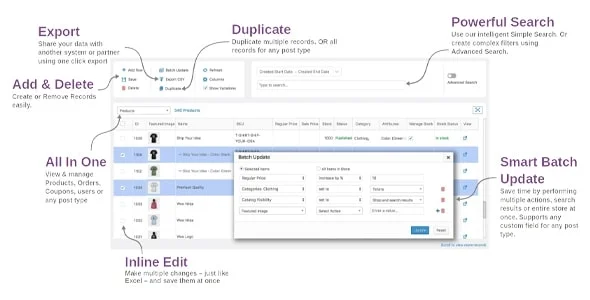
The technical nature of this plugin relies on a grid interface that replicates the logic of a spreadsheet within the WordPress dashboard. Each cell is editable, each column is filterable, and each bulk action is executed with multiple selections, reducing the administrator's cognitive load and minimizing the margin of error in high-volume operations.
Imagine a technician who needs to adjust the price of 300 products after a supplier change. Without this tool, the process would take hours and involve exporting a CSV file, editing it in Excel, and then importing it back, with the risk of data loss. With the add-in active, they select the range, apply the percentage change, and confirm in minutes, all from the back office.
Product overview
Centralized data management in WooCommerce determines whether a team can scale without hiring more administrative staff, because the speed and accuracy of the back office directly affect the profitability and operational stability of any store that grows beyond a basic catalog.
Before this module was implemented, administrators relied on import plugins, custom scripts, or manual, one-by-one editing to update stock, prices, or order statuses. With this tool, those same operations occur within an interactive grid, with advanced filters and batch actions that require no exporting or external processes.
- Without the add-on: Updating seasonal prices in a catalog of 500 products involves exporting, editing in external spreadsheets and importing back, with a real risk of overwriting data or losing variants.
- With the active add-on: The administrator filters by category, selects all visible records, and applies a percentage price increase directly from the grid, without leaving the panel.
- Observable result: The operation, which previously took between 45 minutes and two hours, is now completed in less than ten, with immediate traceability and no intermediate files that could become corrupted.
Requirements and compatibility
For this extension to work stably, the environment must have WooCommerce correctly configured as the main dependency, in addition to active administrator permissions for the entities that you want to manage in bulk, since the tool operates on the same database tables that WooCommerce uses natively.
- WooCommerce must be present and operational as the base data layer; without it, the product, order, and customer management functions have no context to act upon.
- Compatible with standard checkout flows, tax management, coupons, user roles, order statuses and shipping; also offers functional integration with popular WooCommerce ecosystem extensions.
- Before applying mass actions in production, it is advisable to test on a subset of records or in a staging environment, especially when working with complex product variants or customer data with extensive history.
Key benefits for your operation
- Reduction of time spent on repetitive tasks: Updating stock levels, prices, or order statuses individually is one of the biggest time drains in any e-commerce operation. This plugin allows you to apply bulk changes with specific filters, freeing up your team for higher-value tasks. The result is a more streamlined operation without the need to expand your administrative team.
- Granular control without external exports: Relying on CSV files to modify large amounts of data introduces a latent risk of formatting errors, lost columns, or accidental overwriting. This tool operates directly on the records in real time, within the dashboard. This eliminates the export-edit-import cycle and reduces incidents caused by poorly formatted data.
- Efficient management of high-volume orders: When order volume exceeds manual management capacity, outdated order statuses create friction both internally and with the end customer. This module allows you to filter orders by multiple criteria and update statuses in bulk, maintaining traceability without sacrificing speed.
- Online edition without refills: Every time an administrator has to open an entire form to change a single field, they lose context and waste time. The direct cell editing offered by this add-on maintains a continuous workflow, reduces navigation fatigue, and lowers the error rate caused by distraction.
- Advanced filters for operational segmentation: Without real filtering capabilities, managing thousands of products or customers becomes a blind search. This extension allows you to combine multiple filter conditions to isolate precisely the records that need intervention, with surgical precision and without relying on manual SQL queries.
- Scalability without flow degradation: As the store grows, tools that work well with 50 products begin to break down with 5,000. This module is built to handle extensive catalogs without making the management experience slow or unpredictable, making it an operational investment with a progressive return.
Key features of Smart Manager Pro
- Spreadsheet-type interface for bulk management: The interactive grid replicates the visual logic of a spreadsheet within the WordPress dashboard, reducing the learning curve for teams accustomed to Excel or Google Sheets. It allows editing multiple fields across multiple records without switching screens, instantly transforming back-office speed.
- Customizable bulk actions: Beyond editing individual cells, this extension allows you to define actions that are applied simultaneously to all selected records, such as changing prices by percentage, updating stock, or assigning categories. This transforms operations that would normally require additional scripts or plugins into native processes within the panel.
- Filters that can be combined with multiple criteria: The filtering system allows you to build complex queries without technical knowledge, combining conditions based on price, stock, category, status, date, or other custom fields. For stores with heterogeneous catalogs, this is the difference between operating with precision and working blindly.
- Managing entities beyond products: Unlike tools that only cover the catalog, this module extends bulk management to orders, customers, coupons, and other WooCommerce entities. This centralizes operational control in one place, reducing the need to switch between multiple dashboard sections.
- Compatibility with custom fields and metadata: Many stores add extra fields to their products or orders using plugins or custom development. This tool can work with that metadata, ensuring that site customizations are not left out of the bulk management workflow and retain their operational value.
- Real-time search within the grid: Quickly locating a specific record within a large catalog can be as time-consuming as the editing itself. The integrated search engine returns results instantly as you type, without reloading the page, keeping your workflow uninterrupted.
Who is this product for?
This module is designed for those already feeling the strain of managing a store that has grown faster than their administrative tools. It's not for someone who has just launched their first store with ten products, but for those who have been wasting hours on tasks that should be completed in minutes.
- Administrators and technicians of WooCommerce stores who need control and traceability over large volumes of data without depending on external tools or manual exports.
- Agencies and freelancers who manage multiple client projects and need a consistent tool that works predictably in different environments.
- Operations, catalog, or marketing managers who depend on being able to segment, update, and review data quickly to execute campaigns, price updates, or inventory management without technical friction.
Real-world use cases
- Mass price update before a campaign: A fashion store needs to apply a 20% discount to an entire seasonal category before a promotion begins. Without the right tools, this process involves exporting the catalog, editing it in CSV format, and re-importing, risking errors. With this plugin, the administrator filters by category, selects all visible products, and applies the percentage change directly from the grid, updating prices in minutes and making them immediately available at checkout.
- Stock correction after physical inventory: A logistics operator detects discrepancies between the physical inventory and the inventory recorded in the store after a manual count. Correcting each product individually would take hours and introduce more errors. The tool allows users to filter products with incorrect stock, edit quantities directly in the grid, and confirm changes in bulk, with the store reflecting the actual inventory without interrupting availability for the customer.
- Order status management during peak season: During peak sales periods, hundreds of orders remain in pending or processing status without updates. The team cannot open each one individually without becoming overwhelmed. This module allows you to filter orders by date and status, select them all, and update them in bulk to the correct status, keeping communication with the customer synchronized and reducing support incidents related to outdated orders.
- Cleaning and updating customer data: A B2B store needs to update the pricing group or tax information for a customer segment after a change in its business policy. Doing this manually, record by record, is impractical. With this plugin, the administrator filters customers by specific criteria, applies the field change in bulk, and obtains an updated database without additional technical intervention, ready so that the next order from those customers reflects the correct terms from the very first click.
Frequently Asked Questions about Smart Manager Pro
Does it work with any theme or only with specific WooCommerce configurations?
The plugin operates on the WooCommerce data layer, not the theme's visual layer, so compatibility with the active theme isn't critical. What is important is that WooCommerce is correctly configured and that the data types you want to manage are active in the store. If the store uses plugins that extend WooCommerce with custom entities, it's advisable to verify that these entities are recognized by the tool before relying on them in production.
Does it affect the customer experience at checkout in any way?
The operations performed by this module occur in the back office and do not directly affect the customer's checkout flow. However, large-scale changes to prices, stock, or product availability do have immediate consequences for what the customer sees in the store. Therefore, it's advisable to schedule large-scale updates outside of peak traffic periods to prevent a customer from seeing a different price than the one in their cart during the checkout process.
Can I automate rules or apply complex conditions to bulk actions?
The tool allows you to build filters combined with multiple conditions before executing any bulk action, adding a layer of conditional logic without requiring programming. It's not an automation engine with real-time triggers like a marketing automation tool, but it does allow you to precisely define which records to act on before applying changes, reducing the margin of error in operations that could have broad consequences if applied without segmentation.
Does it have any use in managing failed payments or renewals?
If your store uses subscriptions or recurring payments managed by compatible WooCommerce extensions, this module can help filter and update order statuses or customer records related to those flows. It doesn't act as a payment gateway or handle payment retries, but it does facilitate subsequent administrative management, such as identifying which orders failed and updating their status in bulk once payment is resolved through another channel.
How do you handle taxes, coupons, or shipping rules when editing records in bulk?
When editing fields directly from the grid, tax and shipping calculations are not automatically recalculated for existing orders, as these values were already set at checkout. For products, if the base price is modified, tax behavior will follow the active tax settings in WooCommerce. Coupons and shipping rules are not affected by bulk product edits unless their records are directly modified within the tool.
How does it perform with very large catalogs or stores with a high volume of orders?
The tool is designed to handle extensive catalogs and manage large volumes of records more efficiently than the native WooCommerce interface. That said, performance also depends on the server hosting the store, the number of active plugins, and how optimized the database is. In environments with limited resources or highly fragmented databases, bulk queries can be slower, so it's advisable to monitor performance during off-peak hours before establishing critical flows.
Is it viable to use it in multisite configurations or to manage multiple stores from a single panel?
In WordPress Multisite environments, the tool operates on the active WooCommerce instance in each subsite independently. It doesn't offer a consolidated view that cross-references data from multiple stores in a single dashboard. Therefore, if the primary need is to manage several stores simultaneously from a single control point, it's advisable to evaluate whether this limitation is acceptable for the team's workflow before relying on this extension as the central hub for multi-store operations.
How do I know if the plugin is working correctly after applying changes?
A practical way to verify this is to first apply a change to a small, controlled subset of records, then check directly on the front end or in the details of each record that the updated value is as expected. If working with prices, verify that the price displayed on the product page and in the cart matches the edited price. If updating order statuses, verify that the order history reflects the change and that the customer received the corresponding notification if automatic notifications are enabled in WooCommerce.

Written and reviewed by the PrimeGPL Team
At PrimeGPL, we ensure that every piece of published content is verified and reviewed by our team. We analyze features, compatibility, and performance to provide you with clear, up-to-date, and truly useful information for each product listed in our store.
Get your questions answered here
We answer your questions so you can buy in an informed and confident manner.
Does my purchase include updates?
Yes. Every product purchase includes lifetime updates, so you won't have to pay extra under any circumstances.
Is there a daily download limit?
No, not at all. After your purchase, you can download it as many times as you need, without any problem.
On how many websites can I use the products?
You can use your purchases on as many domains (websites) as you want, without any problems.
Does it include technical support?
Yes. We offer technical support Monday through Friday, during business hours UTC -3. This support includes assistance with issues related to download problems, installation problems, or errors with the purchased product.
Furthermore, support does not include configurations, customizations, tutorials, or services associated with the author.
Does my purchase have a warranty?
Yes, of course. If you have any problem that we can't solve, or if there's an external issue that doesn't have a general solution related to our service, you'll receive support and, if necessary, a full refund.
How do I access support?
After your purchase, from your user account, you can access the support section, where you can open a ticket and our team will assist you with whatever you need.
Download Previous Versions
If you have purchased this product, or have an active membership, you can download previous versions without any limits or restrictions.
| Product Name | Version | Size | Date | Download |
|---|---|---|---|---|
| Smart Manager Pro | 8.87.0 | 2.5 MB | 05/05/2026 | Join Now |
Related Products
Below we show you different products that share the same category.